
Developer's Development
3.1.13 [Python] MySQL 연동 본문
- myssql-connector-python library 설치
pip install myssql-connector-python
- mysql 연결
import mysql.connector

connection = mysql.connector.connect(
    host="localhost",           # MYSQL 서버 주소
    user="mylee",         # 사용자 이름
    password="mylee",     # 비밀번호
    database="menudb"           # 사용할 데이터비이스(스키마)
)

if connection.is_connected():
    print("@@@MySQL 서버에 성공적으로 연결@@@")

connection.close()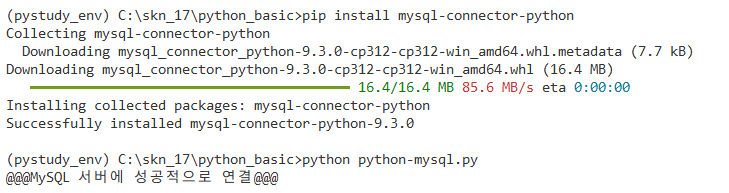
- DB SELECT
import mysql.connector

connection = mysql.connector.connect(
    host="localhost",     # MYSQL 서버 주소
    user="mylee",         # 사용자 이름
    password="mylee",     # 비밀번호
    database="menudb"     # 사용할 데이터비이스(스키마)
)

cursor = connection.cursor()

sql = "SELECT * FROM tbl_menu"

cursor.execute(sql)		  # 쿼리 동작

result_rows = cursor.fetchall()

for row in result_rows:	  # 반복문으로 row 출력
    print(row)

cursor.close()			  # 자원 반납
connection.close()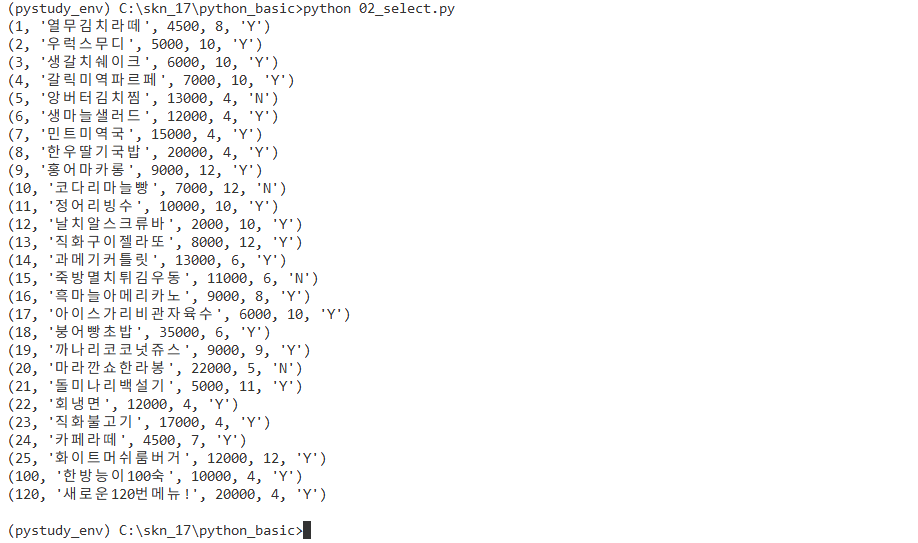
- DB INSERT, UPDATE, DELETE
insert, update, delete는 select와 달리 결과가 출력되지 않으므로, 완료 후 select 실행시켜서 잘 들어갔는지 확인해보기
import mysql.connector

connection = mysql.connector.connect(
    host="localhost",           # MYSQL 서버 주소
    user="mylee",         # 사용자 이름
    password="mylee",     # 비밀번호
    database="menudb"           # 사용할 데이터비이스(스키마)
)

cursor = connection.cursor()

sql = "INSERT INTO tbl_menu (menu_name, menu_price, category_code, orderable_status)" \
"VALUES ('허니콤보', 20000, 4, 'Y')"

cursor.execute(sql)

# commit 처리
connection.commit()

cursor.close()
connection.close()
- %s : placeholder
👉 자리를 만들어놓고 자리에 해당하는 걸 전달받은 애들로 앞에서부터 채워주겠다는 의미이며, 개수와 순서가 맞아야 함.
import mysql.connector

connection = mysql.connector.connect(
    host="localhost",           # MYSQL 서버 주소
    user="mylee",         # 사용자 이름
    password="mylee",     # 비밀번호
    database="menudb"           # 사용할 데이터비이스(스키마)
)

cursor = connection.cursor()

# 메뉴 삽입
sql = "INSERT INTO tbl_menu (menu_name, menu_price, category_code, orderable_status)" \
"VALUES (%s, %s, %s, %s)"
values = ("레드콤보", 23000, 4, "Y")

# 메뉴코드가 7번인 메뉴의 메뉴명과 메뉴가격 수정
# 메뉴코드, 메뉴명, 메뉴가격은 변수에 넣어서 사용
sql = "UPDATE tbl_menu SET menu_name=%s, menu_price=%s WHERE menu_code=%s"
values = ("엽떡에 떡추가", 16000, 7)

# 메뉴코드가 10번인 메뉴 삭제
# 메뉴코드는 변수에 담아서 사용
sql = "DELETE FROM tbl_menu WHERE menu_code = %s"
values = [10]

cursor.execute(sql, values)

# commit 처리
connection.commit()

# 삽입 완료 메시지 출력 (수정, 삭제도 비슷하게 사용하기)
print(f"@@@{cursor.rowcount}개의 행 삽입 완료@@@")

cursor.close()
connection.close()
'프로그래밍과 데이터 기초 > DB' 카테고리의 다른 글
| 3.1.12 [DB] JOIN, SUBQUERY (1) | 2025.07.08 |
|---|---|
| 3.1.11 [DB] DML (0) | 2025.07.08 |
| 3.1.10 [DB] SELECT (1) | 2025.07.08 |
| 3.1.9 [DB] 데이터 모델링 (3) | 2025.07.07 |
| 3.1.8 [DB] 데이터베이스 (2) | 2025.07.06 |
'프로그래밍과 데이터 기초/DB' Related Articles
more
