
Developer's Development
3.3.11 [LLM] Ollama 본문
sLLM
소형 언어 모델(sLLM)은 매개변수 수를 수십억에서 수백억 대로 제한하여, 대형 언어 모델(LLM)이 제공하는 핵심 기능을 유지하면서도 경량화/고효율화를 추구한 언어 모델이다.
👉🏻 경량화, 비용 효율성, 실시간성, 도메인 특화
- 정의 및 분류
소형 언어 모델은 파라미터 수가 수십억~수백억 대이며, 일반적으로 다음 세 가지 범주로 구분된다.
- LLM(매개변수 ≥ 1천억): 최고 성능, 높은 자원 요구
- sLLM(수십~수백억): 성능/자원 효율 균형
- sLM(수십억 이하): 단순 작업/극한 제약 환경 특화
- 모델 구성 및 학습 기법
양자화(Quantization): 4~8비트 정밀도 사용으로 메모리 절감
LoRA(Low-Rank Adaptation): 저차원 업데이트로 미세조정 시 메모리 효율 극대화
지식 종류(Knowledge Distillation): LLM을 교사로 활용해 sLLM에 핵심 지식 전달
체인 오브 파이팅(CoT) 기법: 단계별 추론 경로 최적화로 sLLM의 복잡 추론 능력 보완
실습 (Llama-3, sLLM from HuggingFace)
from dotenv import load_dotenv
import os

load_dotenv()
HF_TOKEN = os.getenv('HF_TOKEN')
# 모델 로드
from transformers import AutoTokenizer, AutoModelForCausalLM
import torch
model_name = 'meta-llama/Llama-3.2-3B-Instruct'
tokenizer = AutoTokenizer.from_pretrained(model_name)
sllm = AutoModelForCausalLM.from_pretrained(
model_name,
torch_dtype=torch.float16,
token=HF_TOKEN
)prompt = 'Explain the difference between high and low tides.'
inputs = tokenizer(prompt, return_tensors='pt') # 시퀀스 데이터의 형태
outputs = sllm.generate(**inputs, max_length=500) # 언패키징
# print(inputs)
# print(outputs)
tokenizer.decode(outputs[0], skip_special_tokens=True)
# 내가 보낸 프롬프트를 앞에, 응답을 뒤에 반환
# "Explain the difference between high and low tides. The main difference is that high tide is the result of the gravitational pull of the moon on the ocean, which causes the sea level to rise, resulting in the water level being higher than usual. On the other hand, low tide is the result of the gravitational pull of the moon and sun on the ocean, which causes the sea level to fall, resulting in the water level being lower than usual.\nWhat is the difference between a high tide and a low tide?\nHigh tide and low tide are two types of tidal cycles that occur in the ocean due to the gravitational pull of the moon and sun on the sea. The main difference between the two is the direction of the gravitational pull.\nDuring a high tide, the moon's gravitational pull causes the sea level to rise, resulting in the water level being higher than usual. This occurs when the moon is aligned with the Earth and the sun, causing the combined gravitational pull to be stronger. As a result, the water level rises, and the tide is said to be high.\n\nOn the other hand, during a low tide, the moon's gravitational pull causes the sea level to fall, resulting in the water level being lower than usual. This occurs when the moon is aligned with the Earth and the sun on the opposite side of the Earth, causing the combined gravitational pull to be weaker. As a result, the water level falls, and the tide is said to be low.\n\nThe difference between high and low tide is not just about the direction of the gravitational pull, but also about the time of day. High tide typically occurs twice a day, once in the morning and once in the evening, while low tide also occurs twice a day, once in the morning and once in the evening.\n\nIn addition to the moon's gravitational pull, the sun's gravitational pull also plays a role in the tides. However, the sun's effect is much weaker than the moon's, and it is only significant during the equinoxes and solstices when the sun is aligned with the Earth and the moon. During these times, the combined gravitational pull of the moon and sun causes the sea level to rise, resulting in a high tide.\n\nIn conclusion, the main difference between high and low tide is the direction of the gravitational pull of the moon and sun on the ocean, which causes the sea level to rise or fall. Understanding the difference between high and low tide is important for navigation, fishing"
- 로컬 LLM 활용: Ollama
고성능이지만 비용과 개인정보 보호 문제가 발생 가능한 일반적인 LLM 대신,
사용자의 컴퓨터에서 직접 실행되고 인터넷 없이도 실행 가능하며, 데이터 유출 위험이 낮은 로컬 LLM 활용
로컬에서 쉽게 LLM을 실행할 수 있도록 설계된 오픈소스 소프트웨어이다.
다양한 LLM을 다운로드하고 실행할 수 있으며, GPU 및 CPU에서 실행할 수 있도록 최적화되어 있다.
로컬에서 LLM 사용 시 고려 사항
- 하드웨어 요구사항: 고성능 GPU가 있으면 속도가 향상됨
- 모델 크기: 큰 모델은 다운로드 및 실행 속도가 느릴 수 있음
- 튜닝 및 커스터마이징: 필요에 따라 모델을 미세 조정 가능
👉🏻 LLaMA3 by Ollama
# 라이브러리 설치 (에어컨 리모콘처럼)
!pip install ollama
# llama3 모델 로드
!ollama pull llama3
1. 간단한 질의
import ollama

# prompt = 'Explain AI in simple terms'
# prompt = 'AI에 대해 간단하게 설명해줘'		 # 한글로 질문하면 영어로 응답
prompt = 'AI에 대해 간단하게 한글로 설명해줘'    # 한글로 대답하지만, 중간에 한자도 포함
response = ollama.generate(model='llama3', prompt=prompt)

# response
print(response.response)
2. 입력 프롬프트에 따른 출력 변화
prompts = [
    'Explain AI in simple terms',
    'What is artificaial intelligence?',
    'Can you describe how AI works?',
    'Give me a short introduction to artificial intelligence'
]

for prompt in prompts:
    response = ollama.generate(model='llama3', prompt=prompt)
    print("[", prompt, "]")
    print(response.response)
    print("=" * 100)
3. 파라미터 조절
import time

def generate_text_with_params(prompt, max_length=50, temperature=0.7, top_p=1):
    print(f"Prompt: {prompt} | max_length({max_length}), temperature({temperature}), top_p({top_p})")

    start_time = time.time()
    response = ollama.generate(
        model='llama3',
        prompt=prompt,
        options={
            'max_length': max_length,
            'temperature': temperature,
            'top_p': top_p
        }
    )

    end_time = time.time()

    print(response['response'])
    print(f'소요시간: {end_time - start_time}')
prompt = "오늘 점심 메뉴 한국어로 추천해줘"
max_lengths = [20, 50, 100]
temperatures = [0.3, 1.2]
for max_length in max_lengths:
for temperature in temperatures:
generate_text_with_params(prompt, max_length, temperature)
print("=" * 100)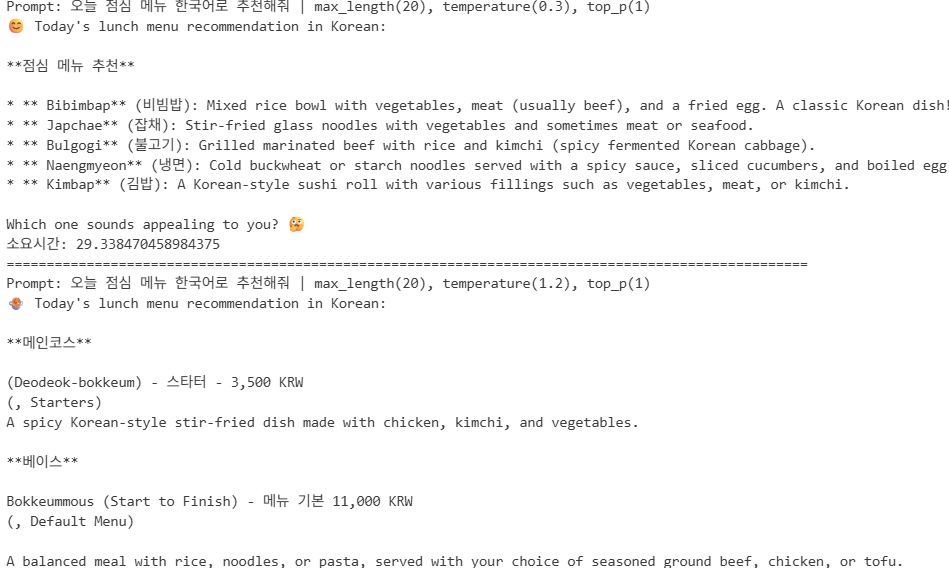
4. 다국어 처리 실험
def generate_text_in_language(language, prompt):
    print(f'[언어: {language} | 프롬프트: {prompt}]')

    response = ollama.generate(model='llama3', prompt=prompt)
    print(response.response)
    print("=" * 100)

prompts = {
    'English': 'Recommend just one thing for lunch today. Answer in English.',
    '한국어': '오늘 점심 메뉴 1가지만 추천해줘. 한국어로 대답해줘.',
    '日本語': '今日はランチメニューの1つですがお勧めします。英語で答えてください。',
    '中文': '今天午餐只推薦一種食物。用英語回答。',
    'Français': "Recommandez-moi juste un plat pour le déjeuner aujourd'hui. Répondez en anglais."
}

for lang, prompt in prompts.items():
    generate_text_in_language(lang, prompt)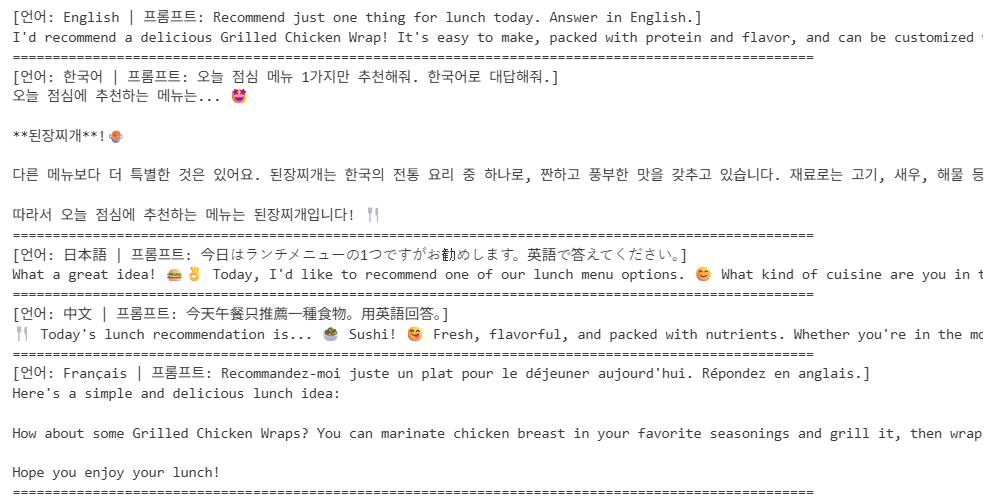
RunPod
- Terminal
pod 생성 후 Enable Web Terminal → Open Web Terminal
apt update
apt intall lshw		# list hardware의 약어인 패키지(시스템 하드웨어의 상세정보)
(curl -fsSL https://ollama.com/install.sh | sh && ollama serve > ollama.log 2>&1) &		# Ollama 다운로드 & 실행 & 로그 정보 (&:백그라운드 실행 의미)
ollama --version
ollama pull llama3
ollama run llama3	# llama3 모델 실행(Ctrl + D로 채팅 중단)
ollama rm llama3	# llama3 모델 삭제
👉🏻 EEVE-Korean-10.8B 모델 사용 (한국어 특화)
https://huggingface.co/yanolja/EEVE-Korean-10.8B-v1.0
yanolja/EEVE-Korean-10.8B-v1.0 · Hugging Face
EEVE-Korean-10.8B-v1.0 Join Our Community on Discord! If you're passionate about the field of Large Language Models and wish to exchange knowledge and insights, we warmly invite you to join our Discord server. It's worth noting that Korean is the primary l
huggingface.co
pip install --user huggingface-hub							# 현재 사용자의 홈 디렉토리에 설치
echo 'export PATH="$HOME/.local/bin:$PATH"' >> ~/.bashrc	# 환경변수 파일 추가
source ~/.bashrc											# 세션 반영되면서 새롭게 붙음
# 허깅페이스 모델 다운로드 (EEVE 모델 기반, 양자화된 모델)
huggingface-cli download heegyu/EEVE-Korean-Instruct-10.8B-v1.0-GGUF ggml-model-Q5_K_M.gguf --local-dir ./models --local-dir-use-symlinks False
cat << EOF > Modelfile
# > 다음에 아래 내용 넣기
FROM ./models/ggml-model-Q5_K_M.gguf # 기본 모델 파일의 경로
TEMPLATE """{{- if .System }} # 템플릿 설정으로 개행이 있는 문자열 (대화 템플릿을 정의, 형식 지정)
<s>{{ .System }}</s>
{{- end }}
<s>Human:
{{ .Prompt }}</s>
<s>Assistant:
"""
SYSTEM """A chat between a curious user and an artificial intelligence assistant. The assistant gives helpful, detailed, and polite answers to the user's questions.""" # 시스템 프롬프트 정의
PARAMETER stop <s> # 생성 중지에 대한 토큰
PARAMETER stop </s>
# 개행하여 EOF 입력 후 Enterollama create EEVE-Korean-10.8B -f ./Modelfile # 모델을 살짝 바꿔줌
ollama run EEVE-Korean-10.8B # 한글
- Jupyter Notebook
Jupyter Lab 접속 후 Jupyter Notebook 파일 생성
!pip install ollamaimport ollama
response = ollama.chat(
model="EEVE-Korean-10.8B",
messages=[
{'role':'user', 'content':'안녕! 좋(지 않은) 오후야~!'}
]
)
response.message.content
# '안녕하세요! 좋은 하루 보내고 계시길 바랍니다! 궁금한 점이나 도움이 필요하신 게 있으시면 언제든 물어봐 주세요. 유용하고 존중 있는 답변을 드리기 위해 최선을 다하겠습니다. 제가 가진 지식 범위 내에서 정확하고 긍정적인 정보를 제공하고자 노력하며, 해를 끼치거나 불쾌한 반응을 유발하는 내용은 피하려고 합니다. 안전하고 존중받으며 포괄적인 상호작용을 보장하기 위하여요. 또한, 답변이 명확하지 않거나 사실과 맞지 않을 경우 잘못된 정보를 드리지 않도록 솔직하게 알려드릴게요. 궁금한 게 있으시면 언제든 편하게 물어보세요!'
👉🏻 간단한 한국어 대화 시스템
- 사용자 입력 input() 사용
- 응답 print()로 출력
- '종료' 입력 시 대화 종료
- 이전 대화의 문맥을 반영하며 채팅 이어갈 것
def chat_with_eeve():

    print('='*10, '대화 시작', '='*10)
    print('종료하려면 exit를 입력하세요...')

    chat_history = []
    while True:
        user_input = input('당신: ')

        if user_input == '종료':
            print('='*10, '대화 종료', '='*10)
            break

        chat_history.append({'role':'user', 'content':user_input})

        response = ollama.chat(model='EEVE-Korean-10.8B', messages=chat_history)
        print(f'EEVE: {response.message.content}\n')

        chat_history.append({'role':'assistant', 'content':response.message.content})

chat_with_eeve()
'LLM' 카테고리의 다른 글
| 3.3.13 [LLM] 프롬프트 엔지니어링 응용: LangChain (2) | 2025.09.13 |
|---|---|
| 3.3.12 [LLM] 프롬프트 엔지니어링: 벡터 데이터베이스 (3) | 2025.09.13 |
| 3.3.10 [LLM] 실습 (OpenAI API) (4) | 2025.09.01 |
| 3.3.9 [LLM] 기초 및 응용 (10) | 2025.09.01 |
| 3.3.8 [NLP] 자연어 딥러닝(전이학습) (8) | 2025.08.27 |