
Developer's Development
3.4.6 [Django] View-Template 연동 본문
Python 웹 표준 라이브러리
- 웹 표준 라이브러리
👉🏻 웹 프로그래밍 요소
Python은 강력한 표준 라이브러리를 제공하며, 이를 통해 웹 요청, 응답, 서버 구동까지 외부 프레임워크 없이도 수행할 수 있다.
이러한 기능은 Django 같은 프레임워크의 기반을 이해하는 데 중요한 역할을 한다.
- 웹 라이브러리 구성
👉🏻 서버-클라이언트 흐름 요약
[클라이언트 요청]
↓
urllib.request → HTTP 요청 전송
↓
[서버 응답]
http.server or wsgiref → HTTP 응답 반환
Django 개요
Django는 파이썬으로 작성된 고수준 웹 프레임워크로, 빠르고 효율적인 웹 개발을 지원한다.
👉🏻 Django 기본 구조 이해
1. 주요 파일
- manage.py: 프로젝트 관리 명령어 실행에 사용되는 스크립트
- settings.py: 프로젝트 설정 파일
- urls.py: URL 경로와 뷰(View) 매핑
- wsgi.py: 배포 시 사용하는 Web Server Gateway Interface 설정
- asgi.py: 비동기 서버와 연결하기 위한 설정
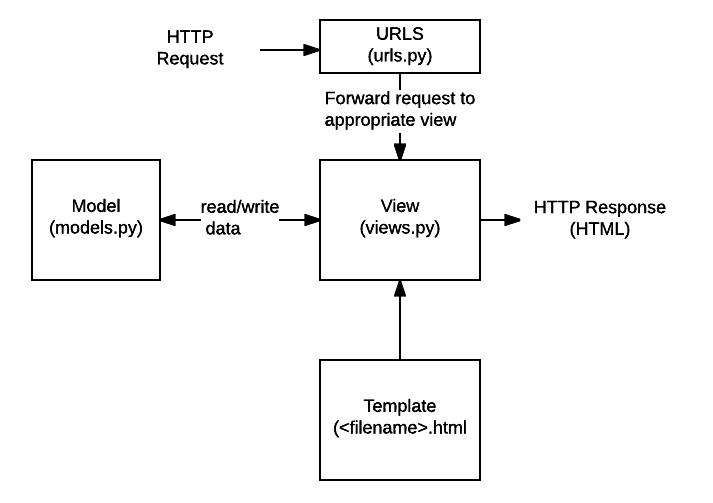
2. Django 요청 처리 흐름
a. 사용자가 URL로 요청
b. Django의 URL Resolver가 urls.py에서 요청 URL을 찾음
c. URL에 연결된 View가 호출되고, 필요한 데이터를 모델에서 가져옴
d. 템플릿 엔진이 데이터를 HTML로 변환하여 사용자에게 반환
- Django 설치 및 프로젝트 생성
👉🏻 가상환경 생성 (Anaconda Prompt)
conda create -n django_env python=3.12 -y
conda activate django_env
pip install django
👉🏻 프로젝트 생성
django-admin startproject _01_django_project
👉🏻 서버 실행
python manage.py runserver localhost:8080
👉🏻 앱 생성
django-admin startapp first
View-Template 연동
- URL 구성과 View
👉🏻 URL 구성
1. first/urls.py 파일 생성
from django.urls import path
from first import views

app_name = 'first'

urlpatterns = [
    path('', views.index, name='index'),
    path('hello/', views.hello, name='hello')
]
2. 프로젝트의 urls.py에 앱의 URL 포함
from django.contrib import admin
from django.urls import path, include

urlpatterns = [
    path('admin/', admin.site.urls),
    path('first/', include('first.urls')),
]
👉🏻 View 작성
1. views.py에서 함수형 뷰 작성
from django.shortcuts import render
from django.http import HttpResponse

def index(request):
    return HttpResponse('<h1>Hello World👋🏻</h1>')		# http://localhost:8080/first/

def hello(request):
    print('hello 함수 호출!!!')
    return HttpResponse('<h1>Hello Django👋🏻</h1>')	# http://localhost:8080/first/hello/
- Django의 템플릿 엔진
👉🏻 URL 구성 및 View 작성은 first와 동일
👉🏻 앱 생성
django-admin startapp second
👉🏻 템플릿 디렉토리 설정
1. settings.py에 템플릿 디렉토리 추가
# 54 Line부터 있는 TEMPLATES 부분에 'DIRS'만 수정
EMPLATES = [
    {
        'BACKEND': 'django.template.backends.django.DjangoTemplates',
        'DIRS': [BASE_DIR / 'templates'],
2. templats/second 디렉토리 생성 및 HTML 파일(index.html) 생성
[ 디렉토리 구조 ]
_01_django_proj
ㄴ _01_django_proj
ㄴ first
ㄴ second
ㄴ templates/second
<!DOCTYPE html>
<html lang="en">
<head>
<meta charset="UTF-8">
<meta name="viewport" content="width=device-width, initial-scale=1.0">
<title>Document</title>
</head>
<body>
<h1>This is Second Index Page🤸🏻♀️</h1>
</body>
</html>
3. 서버 restart 및 http://localhost:8080/second/ 접속
👉🏻 root path(localhost:8080/) 페이지 설정 (404 issue)
1. 프로젝트의 urls.py 수정
from django.contrib import admin
from django.urls import path, include
from django.views.generic import RedirectView

urlpatterns = [
    path('admin/', admin.site.urls),
    path('', RedirectView.as_view(url='first/')),
    path('first/', include('first.urls')),
    path('second/', include('second.urls')),
]
2. second/views.py에서 템플릿 렌더링
from django.shortcuts import render
from django.http import HttpResponse
def index(request):
print(request)
# return HttpResponse('<h1>This is Second Index Page🤸🏻♀️</h1>')
return render(request, 'second/index.html')
3. http://localhost:8080/ 접속
http://localhost:8080/first/로 redirect (status: 302)
Django Templates
👉🏻 프로젝트 및 앱 생성
django-admin startproject _02_django_templates
cd _02_django_templates
django-admin startapp app
👉🏻 템플릿 디렉토리 설정
1. settings.py 수정
- 템플릿 디렉토리 추가
- INSTALLED_APPS 추가 (for intcomma)
- STATICFILES_DIRS 추가 (STATIC_URL 아래)
# 맨 마지막에 humanize 라인 추가
INSTALLED_APPS = [
    'django.contrib.admin',
    ...
    'django.contrib.humanize',
]
...
# 54 Line부터 있는 TEMPLATES 부분에 'DIRS'만 수정
EMPLATES = [
    {
        'BACKEND': 'django.template.backends.django.DjangoTemplates',
        'DIRS': [BASE_DIR / 'templates'],
...
# STATIC_URL 아래에 STATICFILES_DIRS 추가
STATIC_URL = 'static/'

STATICFILES_DIRS = [
    BASE_DIR / 'static'
]
2. templats/app 디렉토리 생성 및 html 추가
[ 디렉토리 구조 ]
_02_django_templates
ㄴ _02_django_templates
ㄴ app
ㄴ static
ㄴ css/style.css
ㄴ images/maeng.jpg
ㄴ js/app.js
ㄴ templates
ㄴ app
ㄴ index.html
ㄴ 01_basics.html
ㄴ 02_layout.html
ㄴ 03_staticfiles.html
ㄴ 04_urls.html
ㄴ layout
ㄴ base.html
ㄴ footer.html
ㄴ header.html
3. 프로젝트의 urls.py에 앱의 URL 포함 및 RedirectView 추가
from django.contrib import admin
from django.urls import path, include
from django.views.generic import RedirectView

urlpatterns = [
    path('admin/', admin.site.urls),
    path('', RedirectView.as_view(url='app/')),
    path('app/', include('app.urls')),
]
4. app/urls.py 추가
from django.urls import path
from app import views

app_name = 'app'

urlpatterns = [
    path('', views.index, name='index'),
    path('basics/', views.basics, name='basics'),
    path('layout/', views.layout, name='layout'),
    path('staticfiles/', views.staticfiles, name='staticfiles'),
    path('urls/', views.urls, name='urls'),
    path('product/<int:id>', views.product, name='product'),
    path('search/', views.search, name='search')
]
5. app/views.py 수정
from django.shortcuts import render
from datetime import datetime

def index(request):
    return render(request, 'app/index.html')

def basics(request):
    context = {
        "name": "맹구",
        "job": "떡잎마을 방범대",
        "height": 150,
        "hobby": ["짱구 괴롭히기", "돌맹이 모으기", "떡잎마을 지키기"],
        "today": datetime.now(),
        "users": [
            {"id": 1, "name": "짱구", "study": False},
            {"id": 2, "name": "훈이", "study": True},
            {"id": 3, "name": "유리", "study": True},
            {"id": 4, "name": "철수", "study": True},
        ],
        "users": [],
        "eng_name": "maenggu",
        "price": 12345.6789
    }
    return render(request, 'app/01_basics.html', context)

def layout(request):
    return render(request, 'app/02_layout.html')

def staticfiles(request):
    return render(request, 'app/03_staticfiles.html')

def urls(request):
    return render(request, 'app/04_urls.html')

def product(request, id):
    print('@@@@@ product id [path variable] @@@@@', id)
    return render(request, 'app/04_urls.html')

def search(request):
    print(request.GET)
    # q = request.GET.get('q')
    # lang = request.GET.get('lang')
    # return render(request, 'app/04_urls.html', {'q': q, 'lang': lang})
    return render(request, 'app/04_urls.html')
6. index.html 수정
<!DOCTYPE html>
<html lang="en">
<head>
    <meta charset="UTF-8">
    <meta name="viewport" content="width=device-width, initial-scale=1.0">
    <title>App | Index</title>
</head>
<body>
    <h1>Django Templates</h1>

    <ul>
        <li><a href="{% url 'app:basics' %}">Basics</a></li>
        <li><a href="{% url 'app:layout' %}">Layout</a></li>
        <li><a href="{% url 'app:staticfiles' %}">StaticFiles</a></li>
        <li><a href="{% url 'app:urls' %}">URLs</a></li>
    </ul>
</body>
</html>
7. html 수정
1) 01_basics.html
<!DOCTYPE html>
<html lang="en">
<head>
    {% load humanize %}
    <meta charset="UTF-8">
    <meta name="viewport" content="width=device-width, initial-scale=1.0">
    <title>templates | Basics</title>
    <style>
        table {
            border: 1px solid #000;
            border-collapse: collapse;
        }
        th, td {
            border: 1px solid #000;
            padding: 5px;
        }
    </style>
</head>
<body>
    <h1>Django Templates: Basics</h1>

    <!-- html 주석 -->
    {# template 한 줄 주석 #}
    {% comment %}
        template
        여러 줄 주석
        따란!
    {% endcomment %}

    <h3>Variables</h3>
    {# views 함수에서 전달한 변수 출력 가능 #}
    <p>내 이름은 {{ name }},</p>
    <p>{{ job }}이죠.</p>

    <h3>Statements</h3>
    <h5>조건 처리</h5>
    {# if, elif, else, ..., endif #}
    {% if height > 180 %}
        <p>어른</p>
    {% else %}
        <p>어린이</p>
    {% endif %}

    <h5>반복 처리</h5>
    <ul>
        {% for h in hobby %}
            <li>{{ h }}</li>
        {% endfor %}
    </ul>

    <table>
        <thead>
            <tr>
                <th>ID</th>
                <th>NAME</th>
                <th>Study Hard</th>
            </tr>
        </thead>
        <tbody>
            {% for user in users %}
                <tr>
                    <td>{{ user.id }}</td>
                    <td>{{ user.name }}</td>
                    <td>
                        <input type="checkbox" {% if user.study %}checked{% endif %}/>
                    </td>
                </tr>
                {% empty %} {# 반복 처리할 대상이 없는 경우 동작 #}
                <tr>
                    <td colspan="3">멤버가 존재하지 않습니다.</td>
                </tr>
            {% endfor %}
        </tbody>
    </table>

    <h3>Filter</h3>
    {# 변수 후처리를 지원하는 표현식 #}
    <ul>
        <li>가격: {{ price|floatformat:2 }}원</li>
        <li>가격: {{ price|intcomma }}원</li>
        <li>자고 일어났더니 키가 컸어! 내 키는 {{ height|add:2 }}cm 야!!!</li>
        <li>자고 일어났더니 키가 컸어! 내 키는 {{ height|add:2 }}cm 야!!!</li>
        <li>오늘은 {{ today }}입니다~</li>
        <li>오늘은 {{ today|date:"Y/m/d" }}입니다~</li>
        <li>오늘은 {{ today|date:"Y/m/d (D) H:i:s" }}입니다~</li>
        <li>My name is {{ eng_name|upper }}@</li>
        <li>My name is {{ eng_name|length }}@</li>
    </ul>

    <h3>Variable Declaration</h3>
    {% now 'Y' as current_year %}
    <p>올해는 {{ current_year }}년!!!</p>

    {% with '순두부찌개' as lunch_menu %}
        <p>오늘 점심 메뉴는 {{ lunch_menu }}로 결정했어!!!</p>
    {% endwith %}
</body>
</html>
2) 02_layout.html
{% extends 'layout/base.html' %}

{% block title %}Layout{% endblock title %}

{% block content %}
    <h1>Django Templates: Layout</h1>
    <p>나랑 같이 돌맹이 모을래??? 🪨💧</p>
{% endblock content %}
2-1) base.html
<!DOCTYPE html>
<html lang="en">
<head>
    <meta charset="UTF-8">
    <meta name="viewport" content="width=device-width, initial-scale=1.0">
    <title>templates | {% block title %}App{% endblock title %}</title>
</head>
<body>
    {% include 'layout/header.html' %}

    <main>
        {% block content %}

        {% endblock content %}
    </main>

    {% include 'layout/footer.html' %}
</body>
</html>
2-2) footer.html
<footer>
    <h1>✉️ maenggu@dduckip.com ✉️</h1>
</footer>
2-3) header.html
<header>
    <h1>💧맹 구 월 드💧</h1>
</header>
3) 03_staticfiles.html (정적 파일 관)
{% load static %}
<!DOCTYPE html>
<html lang="en">
<head>
    <meta charset="UTF-8">
    <meta name="viewport" content="width=device-width, initial-scale=1.0">
    <title>templates | StaticFiles</title>
    <link rel="stylesheet" href="{% static 'css/style.css' %}">
</head>
<body>
    <h1>Django Templates: Static Files</h1>

    <img src="{% static 'images/maeng.jpg' %}" />
    <script src="{% static 'js/app.js' %}"></script>
</body>
</html>
3-1) style.css
h1 {
    color: coral;
}
3-2) app.js
console.log('@@@@@ app.js loaded! @@@@@');
4) 04_urls.html
<!DOCTYPE html>
<html lang="en">
<head>
    <meta charset="UTF-8">
    <meta name="viewport" content="width=device-width, initial-scale=1.0">
    <title>template | URLs</title>
</head>
<body>
    <h1>Django Templates: URLs</h1>

    <h3>Path Variable</h3>
    <div><a href="{% url 'app:product' id=123 %}">123번 product</a></div>

    <h3>Query String</h3>
    <!-- <a href="{% url 'app:search' %}?q={{q}}&lang={{lang}}">
        검색어 {{ q }} | 언어 {{ lang }}
    </a> -->
    <a href="{% url 'app:search' %}?q={{request.GET.q}}&lang={{request.GET.lang}}">
        검색어 {{ request.GET.q }} | 언어 {{ request.GET.lang }}
    </a>
</body>
</html>
8. 서버 실행
python manage.py runserver
'AI 활용 애플리케이션 개발 > Django Framework' 카테고리의 다른 글
| 3.4.10 [Django] Fast API (RESTful API) (0) | 2025.10.28 |
|---|---|
| 3.4.9 [Django] Class-based View(CBV) (0) | 2025.10.19 |
| 3.4.8 [Django] Form 처리 (0) | 2025.10.19 |
| 3.4.7 [Django] Model-DB 연동 (0) | 2025.10.19 |