Developer's Development
3.3.20 [LLM] 자연어-이미지 멀티모달: etc 본문
OpenCV
오픈소스 컴퓨터 비전 라이브러리
- 주요 기능
1. 이미지 처리
2. 비디오 분석
3. 컴퓨터 비전 알고리즘
4. 딥러닝 통합
- 가상환경 생성
conda create -n cv_env python=3.12
conda activate cv_env
pip install jupyter notebook ipykernel matplotlib
python -m ipykernel instal --user --name cv_env --display-name cv_env
- Jupyter Notebook
!pip install opencv-python
1. 이미지 처리
import cv2

img = cv2.imread('maenggu.jpg')	# cv2.IMREAD_COLOR (기본값)
img = cv2.imread('maenggu.jpg', cv2.IMREAD_GRAYSCALE)   # 흑백이미지 (덮어씌워짐, 색상 좌표 변경)

cv2.imshow('My Maenggu', img)	# 창 이름 설정
cv2.waitKey(0)					# 키보드 입력을 기다림
cv2.destroyAllWindows()			# 창이 사라짐
2. 동영상 처리
cap = cv2.VideoCapture('video.mp4')

frame_count = cap.get(cv2.CAP_PROP_FRAME_COUNT) # 영상을 구성하고 있는 전체 frame의 수
fps = cap.get(cv2.CAP_PROP_FPS)                 # 1초당 몇 개의 frame으로 구성되어 있는지
width = cap.get(cv2.CAP_PROP_FRAME_WIDTH)       # 너비와 높이를 픽셀 수로 반환
height = cap.get(cv2.CAP_PROP_FRAME_HEIGHT)
print(frame_count, fps, width, height)			# 350.0 25.0 640.0 360.0

while cap.isOpened():
    ret, frame = cap.read()		# 다음 frame을 읽어옴 (ret: 성공 여부, frame: 읽어온 이미지 frame)

    if not ret:		# 읽어올 게 없거나 오류면 멈춤
        break

    cv2.imshow('My Video', frame)

    if cv2.waitKey(int(1000/fps)) == ord('q'):	# q를 누르면 영상 중단
        break

cap.release()   # 자원 반납
cv2.destroyAllWindows()
3. 웹캠 영상 처리
cap = cv2.VideoCapture(0)   # 0을 넣으면 기본 내장 카메라(웹캠) 입력을 받음

if not cap.isOpened():
    print("Error: 웹캠을 열 수 없습니다.")
    exit()

while True:
    ret, frame = cap.read()

    if not ret:
        break

    cv2.imshow('My WebCam', frame)

    if cv2.waitKey(1) == ord('q'):
        break

cap.release()
cv2.destroyAllWindows()
OCR (Optical Character Recognition)
이미지 → 텍스트 추출
!pip install easyocr --user # 현재 로그인한 사용자에 대해 전용으로 패키지 설치import easyocr
reader = easyocr.Reader(['ko', 'en']) # 이미지로부터 인식할 언어
result = reader.readtext('poem.jpg')
# result
for box, text, conf in result:
print(text)
이미지의 텍스트 → 번역
!pip install paddlepaddle paddleocr scikit-learn translatefrom paddleocr import PaddleOCR
ocr = PaddleOCR(lang='korean')
result = ocr.ocr('poem.jpg')
# result
result = result[0]
texts = result['rec_texts']
confs = result['rec_scores']
boxes = result['rec_boxes']
for text, conf, box in zip(texts, confs, boxes):
print(f"텍스트: {text}, 신뢰도: {conf}, 텍스트 박스 위치: {box}")
# 아까보다 신뢰도 높게 잘 가져옴
"""
텍스트: 윤동주시인의‘서시', 신뢰도: 0.930273711681366, 텍스트 박스 위치: [177 ... 68]
텍스트: 죽는날까지하늘을 우러러, 신뢰도: 0.9459652304649353, 텍스트 박스 위치: [146 ... 117]
텍스트: 한점부끄럼이없기를, 신뢰도: 0.9719920754432678, 텍스트 박스 위치: [160 ... 139]
텍스트: 잎새에이는바람에도, 신뢰도: 0.989228367805481, 텍스트 박스 위치: [163 ... 164]
텍스트: 나는 괴로워했다, 신뢰도: 0.93855881690979, 텍스트 박스 위치: [180 ... 184]
텍스트: 별을노래하는마음으로, 신뢰도: 0.9662727117538452, 텍스트 박스 위치: [150 ... 208]
텍스트: 모든죽어가는것을사랑해야지, 신뢰도: 0.9785605072975159, 텍스트 박스 위치: [110 ... 230]
텍스트: 그리고나한테주어진길을, 신뢰도: 0.9853016138076782, 텍스트 박스 위치: [130 ... 252]
텍스트: 걸어가야겠다, 신뢰도: 0.9982728958129883, 텍스트 박스 위치: [181 ... 273]
텍스트: 오늘밤에도별이바람에스치운다., 신뢰도: 0.9415201544761658, 텍스트 박스 위치: [ 88 ... 322]
"""import numpy as np
def point_center(box):
x_center = box[0] + box[2] / 2
y_center = box[1] + box[3] / 2
return np.array([x_center, y_center])from sklearn.cluster import DBSCAN
def cluster_boxes(boxes, eps=100):
center = np.array([point_center(box) for box in boxes])
clustering = DBSCAN(eps=eps, min_samples=1).fit(center)
labels = clustering.labels_
clusters = {}
for i, label in enumerate(labels):
clusters.setdefault(label, []).append(i)
return list(clusters.values())
boxes = result['rec_boxes']
box_point_data = [
[int(x1), int(y1), int(x2-x1), int(y2-y1)] for (x1, y1, x2, y2) in boxes
]
cluster_result = cluster_boxes(box_point_data)from translate import Translator
translator = Translator(from_lang='ko', to_lang='en')
doc_result = [" ".join([texts[word_idx] for word_idx in cluster])
for cluster in cluster_result]
eng_doc = [translator.translate(text) for text in doc_result]
print(doc_result)
print(eng_doc)
"""
["윤동주시인의‘서시' 죽는날까지하늘을 우러러 한점부끄럼이없기를 잎새에이는바람에도 나는 괴로워했다 별을노래하는마음으로 모든죽어가는것을사랑해야지 그리고나한테주어진길을 걸어가야겠다 오늘밤에도별이바람에스치운다."]
["Yoon Dong-ju's ‘Searcy‘ looked up to the sky until the day he died, so that there would be no shame in the wind on the leaves, but I was distressed. With the mindset of singing the stars, I should love all things dying, and walk the path that was given to me. Even tonight, the stars are clearing the wind."]
"""
YOLO를 사용한 객체 탐지
👉🏻 객체 탐지의 응용 분야
자율 주행 자동차, 영상 감시 시스템, 의료 영상 분석, 스마트 팩토리(생산 라인에서 제품의 결함이나 이상을 자동으로 탐지) 등
👉🏻 객체 탐지 모델 구분
1. 1-Stage Detector
- 구조: 이미지를 입력 받아 한 번에 객체의 위치와 클래스를 예측한다.
- 주요 모델: YOLO (You Only Look Once)
2. 2-Stage Detector
- 구조: 먼저 객체가 있을 가능성이 높은 영역을 추출한 후, 해당 여역에서 클래스와 위치를 예측하는 두 단계로 이루어진다.
- YOLO
객체 탐지를 위한 실시간 알고리즘
👉🏻 주요 특징
- 속도: 실시간 처리가 가능할 정도로 빠르다.
- 단일 신경망 구조: 이미지를 여러 영역으로 나누고 각 영역에서 바운딩 박스와 확률을 예측한다.
- 전역 정보 활용: 전체 이미지를 기반으로 예측하기 때문에 문맥 정보를 잘 활용한다.
👉🏻 대표적인 데이터셋
Pascal VOC (사람, 차량, 가구 등을 구분 가능)
MS COCO
Google OpenImages
실습 (객체 탐지 학슴용 Datasets, vscode)
👇🏻 Download Dataset as zip
https://www.kaggle.com/datasets/gopalbhattrai/pascal-voc-2012-dataset?resource=download
PASCAL VOC 2012 DATASET
PASCAL VOC 2012 DATASET
www.kaggle.com
import cv2
import matplotlib.pyplot as plt

image_path = '.\\archive\\VOC2012_train_val\\VOC2012_train_val\\JPEGImages\\2007_000032.jpg'

image = cv2.cvtColor(cv2.imread(image_path), cv2.COLOR_BGR2RGB)
plt.imshow(image)
!pip install lxmlimport os
import xml.etree.ElementTree as ET
base_dir = os.path.join('archive', 'VOC2012_train_val', 'VOC2012_train_val')
xml_path = os.path.join(base_dir, 'Annotations', '2007_000032.xml')
tree = ET.parse(xml_path)
root = tree.getroot()
filename = root.find('filename').text
size = root.find('size')
width = size.find('width').text
height = size.find('height').text
depth = size.find('depth').text
print(filename, size, width, height, depth, sep=" / ")
print(image.shape)
"""
2007_000032.jpg / <Element 'size' at 0x000001D28A27FB50> / 500 / 281 / 3
(281, 500, 3)
"""objs = root.findall('object')
base_image = image.copy()
for obj in objs:
bnd_box = obj.find('bndbox')
name = obj.find('name').text
xmin = int(bnd_box.find('xmin').text)
ymin = int(bnd_box.find('ymin').text)
xmax = int(bnd_box.find('xmax').text)
ymax = int(bnd_box.find('ymax').text)
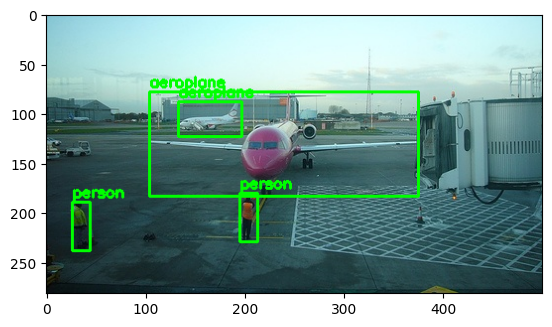
print(f"{name} : ({xmin}, {ymin}), ({xmax}, {ymax})")
cv2.rectangle(base_image, (xmin, ymin), (xmax, ymax), color=(0, 255, 0), thickness=2)
cv2.putText(base_image, name, (xmin, ymin-5), cv2.FONT_HERSHEY_SIMPLEX, 0.5, (0, 255, 0), thickness=2)
plt.imshow(base_image)
"""
aeroplane : (104, 78), (375, 183)
aeroplane : (133, 88), (197, 123)
person : (195, 180), (213, 229)
person : (26, 189), (44, 238)
"""
영역 추정 (Region Proposal, vscode)
cv_env 환경
!pip install selectivesearchimport cv2
import matplotlib.pyplot as plt
image = cv2.cvtColor(cv2.imread("lucky.jpg"), cv2.COLOR_BGR2RGB)
plt.imshow(image)import selectivesearch as ss
img, regions = ss.selective_search(image, scale=100, min_size=2000)
regionscandidate_bnd_boxes = [region['rect'] for region in regions]
base_image = image.copy()
for candidate in candidate_bnd_boxes:
x1, y1, width, height = candidate
x2, y2 = x1 + width, y1 + height
cv2.rectangle(base_image, (x1, y1), (x2, y2), color=(0, 255, 0), thickness=1)
cv2.rectangle(base_image, (150, 150), (600, 700), color=(255, 0),thickness=2)
plt.imshow(base_image)
import numpy as np

def iou(candidate, ground_truth):
    x1 = np.maximum(candidate[0], ground_truth[0])
    y1 = np.maximum(candidate[1], ground_truth[1])
    x2 = np.maximum(candidate[2], ground_truth[3])
    y2 = np.maximum(candidate[3], ground_truth[3])

    candidate_area = (candidate[2] - candidate[0]) * (candidate[3] - candidate[1])
    ground_truth_area = (ground_truth[2] - ground_truth[0]) * (ground_truth[3] - ground_truth[1])

    intersection = np.maximum(0, x2 - x1) * np.maximum(0, y2 - y1)
    union = candidate_area + ground_truth_area - intersection

    return intersection / union
candidate_bnd_boxes = [region['rect'] for region in regions if region['size'] > 20000]
base_image = image.copy()
ground_truth_box = (150, 150, 600, 700)
cv2.rectangle(base_image, (150, 150), (600, 700), color=(255, 0),thickness=2)
for candidate in candidate_bnd_boxes:
x1, y1, width, height = candidate
x2, y2 = x1 + width, y1 + height
iou_score = iou((x1, y1, x2, y2), ground_truth_box)
if iou_score > 0.7:
cv2.rectangle(base_image, (x1, y1), (x2, y2), color=(0, 0, 255), thickness=1)
cv2.putText(base_image, f"{iou_score:.2f}", (x1, y1+20), cv2.FONT_HERSHEY_SIMPLEX, 0.5, (0, 0, 255), thickness=2)
plt.imshow(base_image)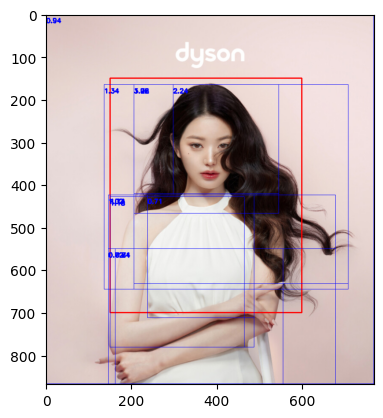
YOLO (You Only Look Once, vscode)
https://docs.ultralytics.com/ko/#how-can-i-get-started-with-yolo-installation-and-setup
홈
Ultralytics YOLO를 만나보세요 - 실시간 객체 감지 및 이미지 분할의 최신 기술입니다. 그 기능에 대해 배우고 프로젝트에서 잠재력을 극대화하십시오.
docs.ultralytics.com
!pip install ultralyticsfrom ultralytics import YOLO
model = YOLO("yolo11n.pt")
- 이미지 객체 탐지
results = model('./resources/bus.jpg')
"""
image 1/1 c:\skn_17\LLM\09_multi_modal\09_vision\resources\bus.jpg: 640x480 4 persons, 1 bus, 357.6ms
Speed: 12.1ms preprocess, 357.6ms inference, 26.4ms postprocess per image at shape (1, 3, 640, 480)
"""

results[0].show()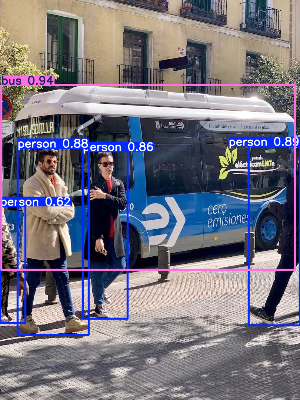
- 비디오 객체 탐지
results = model('./resources/Night_Day_Chase.mp4', show=False, save=True)
- 웹캠 실시간 객체 탐지
import cv2

cap = cv2.VideoCapture(0)

while True:
    ret, frame = cap.read()
    if not ret:
        break

    results = model(frame, verbose=False)
    frame = results[0].plot()

    cv2.imshow('YOLO WebCam', frame)
    if cv2.waitKey(1) == ord('q'):
        break

cap.release()
cv2.destroyAllWindows()
'LLM' 카테고리의 다른 글
| 3.3.22 [LLM] 자연어-이미지 멀티모달: 주요 CNN 모델 (0) | 2025.09.28 |
|---|---|
| 3.3.21 [LLM] 자연어-이미지 멀티모달: CNN 개요 및 구조 (0) | 2025.09.16 |
| 3.3.19 [LLM] 파인튜닝 기법: DPO (0) | 2025.09.15 |
| 3.3.18 [LLM] 파인튜닝 기법: RLHF (0) | 2025.09.14 |
| 3.3.17 [LLM] 파인튜닝 기법: PEFT (0) | 2025.09.14 |