
Developer's Development
3.3.2 [NLP] 자연어 데이터 준비(텍스트 전처리) 본문
텍스트 정규화
다양한 형태로 존재하는 텍스트 데이터를 일관된 형태로 변환하는 과정이다.
이는 모델의 성능을 향상시키고 학습 효율을 높이기 위해 필수적이다.
👉🏻 필요성 : 데이터 일관성 확보, 노이즈 제거, 모델 일반화 능력 향상
👉🏻 주요 방법론 : 대소문자 통합, 숫자 변환 또는 제거, 특수문자 및 구두점 처리, 공백 및 반복 문자 처리
- 텍스트 처리
텍스트 클렌징
: 텍스트에서 불필요한 요소를 제거하여 깨끗한 데이터를 얻는 과정이다.
👉🏻 주요 작업 : HTML 태그 제거, URL 및 이메일 주소 제거, 이모티콘 및 이모지 처리
- 불용어(stopword) 처리
의미 분석이 큰 기여를 하지 않는 단어를 제거하는 과정이다.
👉🏻 특징 : 자주 등장하지만 문장의 의미에는 큰 영향을 주지 않는다. ex) "은", "는", "이", "가", "and", "the", "is"
👉🏻 효과 : 텍스트 데이터의 차원을 줄여 모델의 복잡도를 낮추며, 중요 단어에 더 많은 비중을 둘 수 있다.
👉🏻 주의사항 : 모든 상황에서 불용어를 제거하는 것이 최선은 아니며, 특정 태스크에서는 불용어가 중요한 의미를 가질 수 있다.
- 텍스트 필터링 기법 (특수문자, 숫자 등)
텍스트 필터링
: 텍스트에서 분석에 방해가 되는 요소를 제거하거나 대체하는 과정이다.
👉🏻 특수문자 처리 : 제거(불필요한 특수문자), 대체(의미 있는 특수문자)
👉🏻 숫자 처리 : 제거, 대체, 보존
👉🏻 반복 문자 및 철자 오류 수정 (철자 교정 라이브러리 사용)
- 토큰화(Tokenization) & 형태소 분석
토큰화
: 텍스트를 의미 있는 단위로 분할하는 과정
👉🏻 중요성 : 텍스트 데이터를 모델이 처리할 수 있는 형태로 변환하며, 단어/문장/하위 단위로 분할하여 분석의 기본 단위로 사용
👉🏻 토큰화 방법 : 단어 토큰화, 문장 토큰화, 하위 단위(Subword) 토큰화
형태소 분석
: 단어의 형태소(의미를 가진 최소 단위)를 추출하는 과정
👉🏻 필요성 : 한국어는 교착어로서 단어 변형이 많고 띄어쓰기가 불규칙하며, 형태소 분석을 통해 정확한 의미 단위를 추출
👉🏻 방법 : 어간과 어미 분리, 품사 태깅, 형태소 분석기 도구 KoNLPy (🐿️ JVM 필요)
- 전처리 완료 데이터 확인 및 검증
샘플 데이터 출력, 단어 빈도수 분석
👉🏻 포인트 : 중요 정보 손실 여부 확인, 일관성 확인, 모델 입력 형식에 적합한지 확인
실습 (토큰화)
- 문장이나 단어를 더 작은 단위로 나누어 분석 가능한 단위(토큰, Token)으로 변환하는 과정
- 토큰의 단위가 상황에 따라 다르지만, 보통 의미있는 혹은 처리하는 단위로써 토큰 정의
- 자연어 처리에서 크롤링, 데이터 수집 등으로 얻은 코퍼스 데이터는 정제되지 않은 경우가 많은데 이를 사용 용도에 맞게 토큰화, 정제, 정규화하는 과정이 필요
👉🏻 토큰화 목적
- 문법적 구조 이해
- 유연한 데이터 활용
import nltk

# 기본적인 토큰 처리 지원
nltk.download('punkt')
nltk.download('punkt_tab')
- Subword Tokenization
BertTokenizer
- 단어를 부분 단위로 쪼개어 희귀하거나 새로운 단어도 부분적으로 표현할 수 있도록 함
→ 어휘 크기를 줄이고 다양한 언어 패턴 학습 가능
!pip install transformersfrom transformers import BertTokenizer
tokenizer = BertTokenizer.from_pretrained('bert-base-uncased') # 사전 학습된 BertTokenizer 로드
# word = 'happy'
word = 'unhappiness'
subwords = tokenizer.tokenize(word)
subwords # ['un', '##ha', '##pp', '##iness'] /vocabulary 사전에 없으면 나오는 형식(분해)
text = "NLP is fascinating. It has many applications in real-world scenarios."
tokenizer.tokenize(text) # 각각 분리가 되어서 나옴
- 문자 단위 토큰화
import re

text = "Time Files like an arrow; fruit files like a banana."
re.findall(r'\b\w+\b', text)	# \b: 경계문자(공백, 구두점 등), \w: 워드(숫자, 문자, 언더스코어 등), +: 1개 이상
"""
['Time',
 'Files',
 'like',
 'an',
 'arrow',
 'fruit',
 'files',
 'like',
 'a',
 'banana']
"""
# WordPunctTokenizer: 단어/구두점으로 토큰을 구현 (`, - 포함 단어도 분리)
from nltk.tokenize import WordPunctTokenizer
text = "Don't hesitate to use well-being practices for self-care."
word_punct_tokenizer = WordPunctTokenizer()
print(word_punct_tokenizer.tokenize(text))
print(word_tokenize(text))
"""
['Don', "'", 't', 'hesitate', 'to', 'use', 'well', '-', 'being', 'practices', 'for', 'self', '-', 'care', '.']
['Do', "n't", 'hesitate', 'to', 'use', 'well-being', 'practices', 'for', 'self-care', '.']
"""from nltk.tokenize import TreebankWordTokenizer, word_tokenize
text = """
COVID-19(전염병), Dr.Smith(의사), NASA(우주항공국) 등 특정 기관이나 명칭이 있다.
특수 문자 또한 태그 <br>, 가격 100.50, 2025/08/18 날짜 표현에 사용될 수 있다.
이러한 경우, $100.50울 하나의 토큰으로 유지할 필요가 있다.
"""
treebank_word_tokenizer = TreebankWordTokenizer()
print(treebank_word_tokenizer.tokenize(text))
print(word_tokenize(text))
"""
['COVID-19', '(', '전염병', ')', ',', 'Dr.Smith', '(', '의사', ')', ',', 'NASA', '(', '우주항공국', ')', '등', '특정', '기관이나', '명칭이', '있다.', '특수', '문자', '또한', '태그', '<', 'br', '>', ',', '가격', '100.50', ',', '2025/08/18', '날짜', '표현에', '사용될', '수', '있다.', '이러한', '경우', ',', '$', '100.50울', '하나의', '토큰으로', '유지할', '필요가', '있다', '.']
['COVID-19', '(', '전염병', ')', ',', 'Dr.Smith', '(', '의사', ')', ',', 'NASA', '(', '우주항공국', ')', '등', '특정', '기관이나', '명칭이', '있다', '.', '특수', '문자', '또한', '태그', '<', 'br', '>', ',', '가격', '100.50', ',', '2025/08/18', '날짜', '표현에', '사용될', '수', '있다', '.', '이러한', '경우', ',', '$', '100.50울', '하나의', '토큰으로', '유지할', '필요가', '있다', '.']
"""
- 한국어 토큰화
!pip install kss==5.0.0# kss (Korean Sentence Splitter)
import kss
text = "시간적 배경은 1920년대의 겨울로, 공간적 배경은 경성부. 주인공이자 인력거꾼 김 첨지의 아내는 병에 걸린 지 1달 가량이 지나 있었다. 아내는 단 한 번도 약을 먹어본 적이 없는데, 그 이유는 '병이란 놈에게 약을 주어 보내면 재미를 붙여서 자꾸 온다'는 김 첨지의 신조 때문으로 나오지만 사실 이건 핑계고, 약을 살 돈도 벌지 못하고 있었다는 이유가 더 크다."
kss.split_sentences(text)
- 품사 태깅
pos_tag
- 자연어 처리(NLP)에서 단어에 품사를 태깅하는 함수로, 주로 NLTK와 같은 라이브러리에서 사용된다.
nltk.download('averaged_perceptron_tagger_eng')from nltk.tag import pos_tag
text = "Time flies like an arrow."
tokens = word_tokenize(text)
pos_tags = pos_tag(tokens)
pos_tags
"""
[('Time', 'NNP'),
('flies', 'NNS'),
('like', 'IN'),
('an', 'DT'),
('arrow', 'NN'),
('.', '.')]
"""
spacy
!pip install spacyimport spacy
spacy.cli.download('en_core_web_sm') # 영어모델 다운로드 (사용 전 1회는 반드시 다운로드)
spacy_nlp = spacy.load('en_core_web_sm') # 로드tokens = spacy_nlp(text)
for token in tokens:
print(token.text, ":", token.pos_)
"""
Time : NOUN
flies : VERB
like : ADP
an : DET
arrow : NOUN
. : PUNCT
"""
KoNLPY
- 한국어 자연어 처리를 위한 라이브러리
- 형태소 분석, 품사 태깅, 텍스트 전처리 등 기능 지원
- 여러 형태소 분석기 중 적합한 분석기 선택 가능
!pip install konlpy
👉🏻 JDK17 다운로드 (ZIP)
👉🏻 다운로드 완료 후, 환경변수 설정
Adoptium
Eclipse Adoptium provides prebuilt OpenJDK binaries from a fully open source set of build scripts and infrastructure.
adoptium.net
from konlpy.tag import Okt

text = "오늘 점심은 뭘 먹어볼까. 맛있는 게 뭐지?"

okt = Okt()		# konlpy가 제공하는 한국어 형태소 분석기를 사용하기 위해서는 JVM이 필요함 (jdk 설치 후 정상 작동)

morphs = okt.morphs(text)
morphs	# ['오늘', '점심', '은', '뭘', '먹어', '볼까', '.', '맛있는', '게', '뭐', '지', '?']
# 품사 태깅
pos_tags = okt.pos(text)
pos_tags
"""
[('오늘', 'Noun'),
('점심', 'Noun'),
('은', 'Josa'),
('뭘', 'Noun'),
('먹어', 'Verb'),
('볼까', 'Verb'),
('.', 'Punctuation'),
('맛있는', 'Adjective'),
('게', 'Noun'),
('뭐', 'Noun'),
('지', 'Josa'),
('?', 'Punctuation')]
"""# 명사 추출
nouns = okt.nouns(text)
nouns # ['오늘', '점심', '뭘', '게', '뭐']
실습 (정제 & 정규화)
정제 (Cleansing) : 불필요한 특수 문자, 이모지, 구두점 등 켁스트 데이터에 포함된 노이즈 제거
정규화 (Normalization) : 같은 의미지만 표기가 다른 단어들을 일관된 표현으로 통일
- 정규화
# 규칙기반 정규화: 정해진 룰에 따라 특정지어 치환 작업
text = "The United Kingdom and UK have a long history together. \
Uh-oh! Something went wrong, uhoh."

transformed_text = text.replace("United Kingdom", "UK").replace("Uh-oh", "uhoh")
transformed_text	# 'The UK and UK have a long history together. uhoh! Something went wrong, uhoh.'
# 대소문자 통합
text = "Theater attendance has decreased. the THEATER industry is adapting."
transformed_text = text.lower()
transformed_text # 'theater attendance has decreased. the theater industry is adapting.'
- 정제
불필요한 단어 제거
- 사용 빈도가 매우 적은 단어
- 불용어 (자주 사용되지만 큰 의미를 갖지 않는 단어)
- 특수문자
text = "The quick brown fox jumps over the lazy dog. The fox is quick and agile."
1. 빈도수 낮은 단어 제거
from nltk.tokenize import word_tokenize
from collections import Counter

tokens = word_tokenize(text)

word_counts = Counter(tokens)

filtered_tokens = [token for token in tokens if word_counts[token] >= 2]
filtered_tokens		# ['The', 'quick', 'fox', '.', 'The', 'fox', 'quick', '.']
2. 짧은 단어 제거
tokens = word_tokenize(text)

filtered_tokens = [token for token in tokens if len(token) > 2]
filtered_tokens
"""
['The',
 'quick',
 'brown',
 'fox',
 'jumps',
 'over',
 'the',
 'lazy',
 'dog',
 'The',
 'fox',
 'quick',
 'and',
 'agile']
"""
3. 불용어 (stopword) 제거
from nltk.corpus import stopwords

en_stopwords = stopwords.words('english')
en_stopwords
👉🏻 한국어 불용어 제거
from konlpy.tag import Okt

text = "이 방법은 특히 빅데이터 분석에서 중요한 역할을 합니다. 이를 통해서 더 많은 정보를 얻을 수 있습니다."

okt = Okt()
tokens = okt.morphs(text)
tokens
# https://www.ranks.nl/stopwords/korean
ko_stopwords = set("아 휴 아이구 아이쿠 아이고 어 나 우리 저희 따라 의해 을 를 에 의 가 으로 로 에게 뿐이다 의거하여 근거하여 입각하여 기준으로 예하면 예를 들면 예를 들자면 저 소인 소생 저희 지말고 하지마 하지마라 다른 물론 또한 그리고 비길수 없다 해서는 안된다 뿐만 아니라 만이 아니다 만은 아니다 막론하고 관계없이 그치지 않다 그러나 그런데 하지만 든간에 논하지 않다 따지지 않다 설사 비록 더라도 아니면 만 못하다 하는 편이 낫다 불문하고 향하여 향해서 향하다 쪽으로 틈타 이용하여 타다 오르다 제외하고 이 외에 이 밖에 하여야 비로소 한다면 몰라도 외에도 이곳 여기 부터 기점으로 따라서 할 생각이다 하려고하다 이리하여 그리하여 그렇게 함으로써 하지만 일때 할때 앞에서 중에서 보는데서 으로써 로써 까지 해야한다 일것이다 반드시 할줄알다 할수있다 할수있어 임에 틀림없다 한다면 등 등등 제 겨우 단지 다만 할뿐 딩동 댕그 대해서 대하여 대하면 훨씬 얼마나 얼마만큼 얼마큼 남짓 여 얼마간 약간 다소 좀 조금 다수 몇 얼마 지만 하물며 또한 그러나 그렇지만 하지만 이외에도 대해 말하자면 뿐이다 다음에 반대로 반대로 말하자면 이와 반대로 바꾸어서 말하면 바꾸어서 한다면 만약 그렇지않으면 까악 툭 딱 삐걱거리다 보드득 비걱거리다 꽈당 응당 해야한다 에 가서 각 각각 여러분 각종 각자 제각기 하도록하다 와 과 그러므로 그래서 고로 한 까닭에 하기 때문에 거니와 이지만 대하여 관하여 관한 과연 실로 아니나다를가 생각한대로 진짜로 한적이있다 하곤하였다 하 하하 허허 아하 거바 와 오 왜 어째서 무엇때문에 어찌 하겠는가 무슨 어디 어느곳 더군다나 하물며 더욱이는 어느때 언제 야 이봐 어이 여보시오 흐흐 흥 휴 헉헉 헐떡헐떡 영차 여차 어기여차 끙끙 아야 앗 아야 콸콸 졸졸 좍좍 뚝뚝 주룩주룩 솨 우르르 그래도 또 그리고 바꾸어말하면 바꾸어말하자면 혹은 혹시 답다 및 그에 따르는 때가 되어 즉 지든지 설령 가령 하더라도 할지라도 일지라도 지든지 몇 거의 하마터면 인젠 이젠 된바에야 된이상 만큼 어찌됏든 그위에 게다가 점에서 보아 비추어 보아 고려하면 하게될것이다 일것이다 비교적 좀 보다더 비하면 시키다 하게하다 할만하다 의해서 연이서 이어서 잇따라 뒤따라 뒤이어 결국 의지하여 기대여 통하여 자마자 더욱더 불구하고 얼마든지 마음대로 주저하지 않고 곧 즉시 바로 당장 하자마자 밖에 안된다 하면된다 그래 그렇지 요컨대 다시 말하자면 바꿔 말하면 즉 구체적으로 말하자면 시작하여 시초에 이상 허 헉 허걱 바와같이 해도좋다 해도된다 게다가 더구나 하물며 와르르 팍 퍽 펄렁 동안 이래 하고있었다 이었다 에서 로부터 까지 예하면 했어요 해요 함께 같이 더불어 마저 마저도 양자 모두 습니다 가까스로 하려고하다 즈음하여 다른 다른 방면으로 해봐요 습니까 했어요 말할것도 없고 무릎쓰고 개의치않고 하는것만 못하다 하는것이 낫다 매 매번 들 모 어느것 어느 로써 갖고말하자면 어디 어느쪽 어느것 어느해 어느 년도 라 해도 언젠가 어떤것 어느것 저기 저쪽 저것 그때 그럼 그러면 요만한걸 그래 그때 저것만큼 그저 이르기까지 할 줄 안다 할 힘이 있다 너 너희 당신 어찌 설마 차라리 할지언정 할지라도 할망정 할지언정 구토하다 게우다 토하다 메쓰겁다 옆사람 퉤 쳇 의거하여 근거하여 의해 따라 힘입어 그 다음 버금 두번째로 기타 첫번째로 나머지는 그중에서 견지에서 형식으로 쓰여 입장에서 위해서 단지 의해되다 하도록시키다 뿐만아니라 반대로 전후 전자 앞의것 잠시 잠깐 하면서 그렇지만 다음에 그러한즉 그런즉 남들 아무거나 어찌하든지 같다 비슷하다 예컨대 이럴정도로 어떻게 만약 만일 위에서 서술한바와같이 인 듯하다 하지 않는다면 만약에 무엇 무슨 어느 어떤 아래윗 조차 한데 그럼에도 불구하고 여전히 심지어 까지도 조차도 하지 않도록 않기 위하여 때 시각 무렵 시간 동안 어때 어떠한 하여금 네 예 우선 누구 누가 알겠는가 아무도 줄은모른다 줄은 몰랏다 하는 김에 겸사겸사 하는바 그런 까닭에 한 이유는 그러니 그러니까 때문에 그 너희 그들 너희들 타인 것 것들 너 위하여 공동으로 동시에 하기 위하여 어찌하여 무엇때문에 붕붕 윙윙 나 우리 엉엉 휘익 윙윙 오호 아하 어쨋든 만 못하다 하기보다는 차라리 하는 편이 낫다 흐흐 놀라다 상대적으로 말하자면 마치 아니라면 쉿 그렇지 않으면 그렇지 않다면 안 그러면 아니었다면 하든지 아니면 이라면 좋아 알았어 하는것도 그만이다 어쩔수 없다 하나 일 일반적으로 일단 한켠으로는 오자마자 이렇게되면 이와같다면 전부 한마디 한항목 근거로 하기에 아울러 하지 않도록 않기 위해서 이르기까지 이 되다 로 인하여 까닭으로 이유만으로 이로 인하여 그래서 이 때문에 그러므로 그런 까닭에 알 수 있다 결론을 낼 수 있다 으로 인하여 있다 어떤것 관계가 있다 관련이 있다 연관되다 어떤것들 에 대해 이리하여 그리하여 여부 하기보다는 하느니 하면 할수록 운운 이러이러하다 하구나 하도다 다시말하면 다음으로 에 있다 에 달려 있다 우리 우리들 오히려 하기는한데 어떻게 어떻해 어찌됏어 어때 어째서 본대로 자 이 이쪽 여기 이것 이번 이렇게말하자면 이런 이러한 이와 같은 요만큼 요만한 것 얼마 안 되는 것 이만큼 이 정도의 이렇게 많은 것 이와 같다 이때 이렇구나 것과 같이 끼익 삐걱 따위 와 같은 사람들 부류의 사람들 왜냐하면 중의하나 오직 오로지 에 한하다 하기만 하면 도착하다 까지 미치다 도달하다 정도에 이르다 할 지경이다 결과에 이르다 관해서는 여러분 하고 있다 한 후 혼자 자기 자기집 자신 우에 종합한것과같이 총적으로 보면 총적으로 말하면 총적으로 대로 하다 으로서 참 그만이다 할 따름이다 쿵 탕탕 쾅쾅 둥둥 봐 봐라 아이야 아니 와아 응 아이 참나 년 월 일 령 영 일 이 삼 사 오 육 륙 칠 팔 구 이천육 이천칠 이천팔 이천구 하나 둘 셋 넷 다섯 여섯 일곱 여덟 아홉 령 영".split())
print(len(ko_stopwords))
print(ko_stopwords)

cleaned_tokens = [token for token in tokens if token not in ko_stopwords]
cleaned_tokens
# 불용어 파일로부터 불용어 로드
def load_stopwords(filepath):
with open(filepath, 'r', encoding='UTF-8') as f:
stopwords = [line.strip() for line in f]
return stopwords
ko_stopwords = load_stopwords('ko_stopwords.txt')
cleaned_tokens = [token for token in tokens if token not in ko_stopwords]
cleaned_tokens
실습 (어간/표제어 추출)
어간 (Stem)
- 단어의 의미를 담고 있는 단어의 핵심 부분
표제어 (Lemma)
- 단어의 사전적 형태 (단어의 기본형)
- 언어의 문법적 규칙에 따라 변형된 단어를 원래 형태로 돌려놓은 것
왜 추출할까?
1. 의미 일관성
2. 데이터 차원 축소
3. 노이즈 감소
4. 정확성 향상
# 어간 추출
from nltk.stem import PorterStemmer
from nltk.tokenize import word_tokenize

text = "The runners were running swiftly and easily. They ran pasf the finish line."

tokens = word_tokenize(text)

stemmer = PorterStemmer()
stemmed_tokens = [stemmer.stem(token) for token in tokens]

print(tokens)
print(stemmed_tokens)
"""
['The', 'runners', 'were', 'running', 'swiftly', 'and', 'easily', '.', 'They', 'ran', 'pasf', 'the', 'finish', 'line', '.']
['the', 'runner', 'were', 'run', 'swiftli', 'and', 'easili', '.', 'they', 'ran', 'pasf', 'the', 'finish', 'line', '.']
"""
# 표제어 추출
from nltk.stem import WordNetLemmatizer
lemmatizer = WordNetLemmatizer()
lemmatized_tokens = [lemmatizer.lemmatize(token, pos='v') for token in tokens]
print(tokens)
print(lemmatized_tokens)
"""
['The', 'runners', 'were', 'running', 'swiftly', 'and', 'easily', '.', 'They', 'ran', 'pasf', 'the', 'finish', 'line', '.']
['The', 'runners', 'be', 'run', 'swiftly', 'and', 'easily', '.', 'They', 'run', 'pasf', 'the', 'finish', 'line', '.']
"""
실습 (정규표현식)
- 특정한 규칙을 가진 문자열을 찾기 위한 패턴
- 정규 표현식을 사용하면 대량의 텍스트 데이터에서 특정 패턴을 효율적으로 추출, 삭제, 대체 가능
# 정규표현식 모듈
import re
- Syntax
| 특수문자 | 설명 | 예시 |
| . | 임의의 한 문자 | a, c : abc, a1c 등과 매치 |
| ? | 앞 문자가 0개 또는 1개 있을 때 매치 | ab?c : abc, ac와 매치 |
| * | 앞 문자가 0개 이상 있을 때 매치 | ab*c : ac, abc, abbc |
| + | 앞 문자가 1개 이상 있을 때 매치 | ab+c : abc, abbc |
| ^ | 문자열이 특정 문자로 시작할 때 매치 | ^abc : abcde, abc와 매치 |
| $ | 문자열이 특정 문자로 끝날 때 매치 | abc$ : deabc, abc와 매치 |
| {n} | 문자가 정확히 n번 반복될 때 매치 | a{2}b : aab와 매치 |
| {n,m} | 문자가 n번 이상 m번 이하 반복될 때 매치 | a{2,4}b : aab, aaab, aaaab |
| [ ] | 대괄호 안의 문자 중 하나와 매치 | [a, b, c] : a, b, c |
| [^ ] | 대괄호 안의 문자 제외하고 매치 | [^abc] : d, e, 1 |
| | | OR 연산자로 둘 중 하나로 매치 | a|b : a 또는 b |
임의의 한 글자 .
reg_exp = re.compile('a.c')

print(reg_exp.search('abc'))
print(reg_exp.search('aXc'))
print(reg_exp.search('a c'))
print(reg_exp.search('ac'))
print(reg_exp.search('bc'))
"""
<re.Match object; span=(0, 3), match='abc'>
<re.Match object; span=(0, 3), match='aXc'>
<re.Match object; span=(0, 3), match='a c'>
None
None
"""
수량자 * : 0개 이상
reg_exp = re.compile('ab*c')	# a로 시작 + b가 0개 이상 + c로 끝

print(reg_exp.search('ac'))
print(reg_exp.search('ab'))
print(reg_exp.search('abc'))
print(reg_exp.search('adc'))
print(reg_exp.search('abbbbbbc'))
"""
<re.Match object; span=(0, 2), match='ac'>
None
<re.Match object; span=(0, 3), match='abc'>
None
<re.Match object; span=(0, 8), match='abbbbbbc'>
"""
수량자 ? : 0개 또는 1개
reg_exp = re.compile('ab?c')    # a로 시작 + b가 0개 또는 1개 + c로 끝

print(reg_exp.search('ac'))
print(reg_exp.search('ab'))
print(reg_exp.search('abc'))
print(reg_exp.search('adc'))
print(reg_exp.search('abbbbbbc'))
"""
<re.Match object; span=(0, 2), match='ac'>
None
<re.Match object; span=(0, 3), match='abc'>
None
None
"""
수량자 + : 1개 이상
reg_exp = re.compile('ab+c')    # a로 시작 + b가 1개 이상 + c로 끝

print(reg_exp.search('ac'))
print(reg_exp.search('ab'))
print(reg_exp.search('abc'))
print(reg_exp.search('adc'))
print(reg_exp.search('abbbbbbc'))
"""
None
None
<re.Match object; span=(0, 3), match='abc'>
None
<re.Match object; span=(0, 8), match='abbbbbbc'>
"""
수량자 {n} : n개
reg_exp = re.compile('ab{3}c')    # a로 시작 + b가 n개 + c로 끝

print(reg_exp.search('ac'))
print(reg_exp.search('abc'))
print(reg_exp.search('abbbc'))
print(reg_exp.search('abbbbbc'))
print(reg_exp.search('abbbbbbbc'))
"""
None
None
<re.Match object; span=(0, 5), match='abbbc'>
None
None
"""
수량자 {min, max} : min개 ~ max개
reg_exp = re.compile('ab{1,3}c')    # a로 시작 + b가 min개 이상 max개 이하 + c로 끝

print(reg_exp.search('ac'))
print(reg_exp.search('abc'))
print(reg_exp.search('abbbc'))
print(reg_exp.search('abbbbbc'))
print(reg_exp.search('abbbbbbbc'))
"""
None
<re.Match object; span=(0, 3), match='abc'>
<re.Match object; span=(0, 5), match='abbbc'>
None
None
"""
정규표현식에 맞는 패턴을 다 찾고 싶다면?
reg_exp = re.compile('a.c')

text = 'aksdjflaabcksjdflkjlkaiosabcdoiejalksdabcnva'

# reg_exp.search(text)
for temp in re.finditer(reg_exp, text):
    print(temp)
"""
<re.Match object; span=(8, 11), match='abc'>
<re.Match object; span=(25, 28), match='abc'>
<re.Match object; span=(38, 41), match='abc'>
"""
문자 매칭 [ ] : [ ] 안에 있는 것 중 한 글자
한 글자에 대한 목록/범위 작성
reg_exp = re.compile('[abc]', re.IGNORECASE)

print(reg_exp.search('안녕하세요, abc입니다!'))
print(reg_exp.search('안녕하세요, cba입니다!'))
print(reg_exp.search('안녕하세요, ABC입니다!'))
"""
<re.Match object; span=(7, 8), match='a'>
<re.Match object; span=(7, 8), match='c'>
<re.Match object; span=(7, 8), match='A'>
"""
# 영문자 대소문자, 숫자 모두 탐색
reg_exp = re.compile('[a-zA-Z0-9]')
print(re.findall(reg_exp, '8월 18일이네요. 안녕하세요 AbC 씨!')) # ['8', '1', '8', 'A', 'b', 'C']
시작하는 문자열 ^
reg_exp = re.compile('^who')

print(reg_exp.search('who is who'))
print(reg_exp.search('is who'))

print(re.findall('who', 'who is who'))
print(re.findall('^who', 'who is who'))
print(re.findall('^who', 'is who'))
"""
<re.Match object; span=(0, 3), match='who'>
None
['who', 'who']
['who']
[]
"""
- re 모듈 함수 & re 객체 메서드
👉🏻 메서드 search() : 문자열 패턴 검사
reg_exp = re.compile('ab')

print(reg_exp.search('abc'))
print(reg_exp.search('123'))
print(reg_exp.search('123abc'))
"""
<re.Match object; span=(0, 2), match='ab'>
None
<re.Match object; span=(3, 5), match='ab'>
"""
👉🏻 메서드 match() : 시작하는 문자열 패턴 검사
reg_exp = re.compile('ab')

print(reg_exp.match('abc'))
print(reg_exp.match('123'))
print(reg_exp.match('123abc'))
"""
<re.Match object; span=(0, 2), match='ab'>
None
None
"""
👉🏻 함수 split() : 정규식 패턴으로 문자열 분할
text = "Apple Banana Orange"
split_text = re.split('[bo]', text, flags=re.IGNORECASE)
split_text	# ['Apple ', 'anana ', 'range']
👉🏻 함수 findall() : 매칭된 결과 모두 반환
text = "제 전화번호는 010-1234-5678 입니다."

nums = re.findall('[0-9]+', text)
nums	# ['010', '1234', '5678']
nums = re.findall('[0-9]+-[0-9]+-[0-9]+', text)
nums	# ['010-1234-5678']
👉🏻 함수 sub() : 해당 패턴의 문자열을 대체
text = "Hello, everyone! Welcome to NLP 👩🏻💻👩🏻💻👩🏻💻👩🏻💻👩🏻💻"
sub_text = re.sub('[^a-zA-Z ]', '', text)
sub_text # 'Hello everyone Welcome to NLP '
- 정규표현식 토큰화
from nltk.tokenize import RegexpTokenizer

text = "He's a runner, but not a long_distance runner. His number is 1234."

tokenizer = RegexpTokenizer('[a-zA-Z0-9_]+')    # 영소/대문자, 숫자, _만 허용
tokenizer = RegexpTokenizer(r'\w+')             # 영소/대문자, 숫자, _만 허용

tokens = tokenizer.tokenize(text)
tokens
"""
['He',
 's',
 'a',
 'runner',
 'but',
 'not',
 'a',
 'long_distance',
 'runner',
 'His',
 'number',
 'is',
 '1234']
"""
실습 (정수 인코딩)
- 자연어 처리는 텍스트 데이터를 숫자로 변환하여 컴퓨터로 이해할 수 있도록 만드는 것이 핵심
- 정수 인코딩을 수행하여 텍스트 데이터에 고유한 인덱스를 부여 (1~5,000)
- 이러한 인코딩 과정은 전처리 과정에서 필수적이며 각 단어의 등장 빈도에 따라 인덱스를 부여하는 것이 일반적
- 단어 수를 5,000으로 제한하는 것은 모델 학습에 필요한 메모리와 계산 자원을 줄이기 위함 (등장 빈도가 낮은 단어는 제외하고 상위 5,000개 단어만 선택하는 것이 일반적)
- 인코딩 처리
토큰화 + 정제/정규화 (복습 포함)
from nltk.tokenize import word_tokenize, sent_tokenize
from nltk.corpus import stopwords

# 문장 토큰화
sentences = sent_tokenize(raw_text)

# 영어 불용어 리스트
en_stopwords = stopwords.words('english')

# 단어사전 (key=단어, value=빈도)
vocab = {}

# 토큰화/정제/정규화 처리 결과
preprocessed_sentences = []

# 토큰만큼 반복
for sentence in sentences:
    # 대소문자 정규화 (소문자 변환)
    sentence = sentence.lower()
    # 단어 토큰화
    tokens = word_tokenize(sentence)
    # 불용어 제거
    tokens = [token for token in tokens if token not in en_stopwords]
    # 단어 길이가 2 이하면 제거
    tokens = [token for token in tokens if len(token) > 2]

    for token in tokens:
        if token not in vocab:
            vocab[token] = 1
        else:
            vocab[token] += 1

    preprocessed_sentences.append(tokens)
- 빈도수 기반 정제
# 빈도수 기반 역순 정렬
vocab_sorted = sorted(vocab.items(), key=lambda item: item[1], reverse=True)
# vocab_sorted

# 인덱스 단어사전 생성 (key=단어, value=인덱스)
word_to_idx = {word: i+1 for i, (word, cnt) in enumerate(vocab_sorted)}
# word_to_idx

# 인덱스 단어사전2 생성 (key=인덱스, value=단어)
idx_to_word = {i+1: word for i, (word, cnt) in enumerate(vocab_sorted)}
# idx_to_word

vocab_size = 15
word_to_idx = {word: index for word, index in word_to_idx.items() if index <= vocab_size}
word_to_idx
"""
{'prince': 1,
 'little': 2,
 'pilot': 3,
 'rose': 4,
 'fox': 5,
 'young': 6,
 'planet': 7,
 'earth': 8,
 'story': 9,
 'plane': 10,
 'meets': 11,
 'asteroid': 12,
 'lessons': 13,
 'love': 14,
 'importance': 15}
"""
- OOV 처리
OOV(Out of Vocabulary) : 단어사전에 정의되지 않은 단어를 가르키는 키워드
word_to_idx['OOV'] = len(word_to_idx) + 1
# word_to_idx
👉🏻 수열처리 (=정수 인코딩)
encoded_sentences = []
oov_idx = word_to_idx['OOV']

for sentence in preprocessed_sentences:
    encoded_sentence = [word_to_idx.get(token, oov_idx) for token in sentence]
    print(sentence)
    print(encoded_sentence)
    print()
    encoded_sentences.append(encoded_sentence)
- Keras Tokenizer
!pip install tensorflowfrom tensorflow.keras.preprocessing.text import Tokenizer
tokenizer = Tokenizer(num_words=15, oov_token='<OOV>')
tokenizer.fit_on_texts(preprocessed_sentences)
# tokenizer.word_index # corpus의 모든 단어를 대상으로 생성
# tokenizer.index_word # corpus의 모든 단어를 대상으로 생성
# tokenizer.word_counts # corpus의 모든 단어를 대상으로 빈도수를 반환
sequences = tokenizer.texts_to_sequences(preprocessed_sentences) # 정수 인코딩
# sequences
실습 (Padding)
자연어 처리에서 각 문장(문서)의 길이는 다를 수 있음
그러나 언어모델은 고정된 길이의 데이터를 효율적으로 처리함
따라서 모든 문장의 길이를 동일하게 맞춰주는 작업이 필요함 == 패딩
👉🏻 패딩 이점
1. 일관된 입력 형식
2, 병렬 연산 최적화
3. 유연한 데이터 처리
!pip3 install torch torchvisionimport torch
from collections import Counter
class TokenizerForPadding:
def __init__(self, num_words=None, oov_token='<OOV>'):
self.num_words = num_words
self.oov_token = oov_token
self.word_index = {}
self.index_word = {}
self.word_counts = Counter()
def fit_on_texts(self, texts):
# 빈도수 세기
for sentence in texts:
self.word_counts.update(word for word in sentence if word)
# 빈도수 기반 vocabulary 생성
vocab = [self.oov_token] + \
[word for word, _ in self.word_counts.most_common(self.num_words - 2 if self.num_words else None)]
self.word_index = {word: i+1 for i, word in enumerate(vocab)}
self.index_word = {i: word for word, i in self.word_index.items()}
def texts_to_sequences(self, texts):
return [[self.word_index.get(word, self.word_index[self.oov_token])
for word in sentence] for sentence in texts]def pad_sequences(sequences, maxlen=None, padding='pre', truncating='pre', value=0):
if maxlen is None:
maxlen = max(len(seq) for seq in sequences)
padded_sequences = []
for seq in sequences:
if len(seq) > maxlen:
if truncating == 'pre':
seq = seq[-maxlen:]
else: # post
seq = seq[:maxlen]
else:
pad_length = maxlen - len(seq)
if padding == 'pre':
seq = [value] * pad_length + seq
else: # post
seq = seq + [value] * pad_length
padded_sequences.append(seq)
return torch.tensor(padded_sequences)tokenizer = TokenizerForPadding(num_words=15)
tokenizer.fit_on_texts(preprocessed_sentences)
sequences = tokenizer.texts_to_sequences(preprocessed_sentences)
sequences
"""
[[2, 6],
[2, 9, 6],
[2, 4, 6],
[10, 3],
[3, 5, 4, 3],
[4, 3],
[2, 5, 7],
[2, 5, 7],
[2, 5, 3],
[8, 8, 4, 3, 11, 2, 12],
[2, 13, 4, 14]]
"""padded = pad_sequences(sequences, padding='post', truncating='post', maxlen=3)
padded
"""
tensor([[ 2, 6, 0],
[ 2, 9, 6],
[ 2, 4, 6],
[10, 3, 0],
[ 3, 5, 4],
[ 4, 3, 0],
[ 2, 5, 7],
[ 2, 5, 7],
[ 2, 5, 3],
[ 8, 8, 4],
[ 2, 13, 4]])
"""
- keras Tokenizer 이용
from tensorflow.keras.preprocessing.text import Tokenizer

tokenizer = Tokenizer()
tokenizer.fit_on_texts(preprocessed_sentences)
sequences = tokenizer.texts_to_sequences(preprocessed_sentences)
sequences
from tensorflow.keras.preprocessing.sequence import pad_sequences
padded = pad_sequences(sequences, padding='post', maxlen=3, truncating='post')
padded
실습 (원핫인코딩)
# 앞에서 사용한 어린왕자 raw_text와 전처리 과정은 동일
from tensorflow.keras.preprocessing.text import Tokenizer
from tensorflow.keras.preprocessing.sequence import pad_sequences

tokenizer = Tokenizer(num_words=15, oov_token='<OOV>')
tokenizer.fit_on_texts(preprocessed_sentences)
sequences = tokenizer.texts_to_sequences(preprocessed_sentences)

padded_seqs = pad_sequences(sequences, maxlen=10, truncating='pre')
from tensorflow.keras.utils import to_categorical
one_hot_encoded = to_categorical(padded_seqs)
one_hot_encoded.shape # (13, 10, 15) /몇 칸짜리 배열을 만들 것인지 알기 위해 확인
- 한국어 전처리
1. 토큰화 (형태소 분석)
2. 시퀀스 처리 Tokenizer
3. 패딩 처리 pad_sequences
4. one-hot encoding
texts = [
    "나는 오늘 학원에 간다.",
    "친구들이랑 맛있는 점심 먹을 생각에 신난다.",
    "오늘은 강사님이 무슨 간식을 줄까?"
]
from konlpy.tag import Okt
import re
okt = Okt()
ko_stopwords = ["은", "는", "이", "가", "을", "를", "의", "과", "에", "의", "으로", "나", "내", "우리", "들"]
preprocessed_texts = []
for text in texts:
tokens = okt.morphs(text, stem=True)
tokens = [token for token in tokens if token not in ko_stopwords]
tokens = [token for token in tokens if not re.search(r'[\s.,:;?!]', token)]
preprocessed_texts.append(tokens)
preprocessed_texts
"""
[['오늘', '학원', '간다'],
['친구', '이랑', '맛있다', '점심', '먹다', '생각', '신나다'],
['오늘', '강사', '님', '무슨', '간식', '주다']]
"""from tensorflow.keras.preprocessing.text import Tokenizer
from tensorflow.keras.preprocessing.sequence import pad_sequences
from tensorflow.keras.utils import to_categorical
# 시퀀스 처리
tokenizer = Tokenizer(oov_token='<OOV>')
tokenizer.fit_on_texts(preprocessed_texts)
sequences = tokenizer.texts_to_sequences(preprocessed_texts)
# sequences
# [[2, 3, 4], [5, 6, 7, 8, 9, 10, 11], [2, 12, 13, 14, 15, 16]]
# 패딩 처리
padded_seqs = pad_sequences(sequences, maxlen=3)
# padded_seqs
"""
array([[ 2, 3, 4],
[ 9, 10, 11],
[14, 15, 16]], dtype=int32)
"""
# 원핫인코딩
one_hot_encoded = to_categorical(padded_seqs)
one_hot_encoded.shape # (3, 3, 17)
from tensorflow.keras import models, layers

input = layers.Input(shape=(3, 17))
x = layers.SimpleRNN(8)(input)
output = layers.Dense(1, activation='sigmoid')(x)

model = models.Model(inputs=input, outputs=output)
model.summary()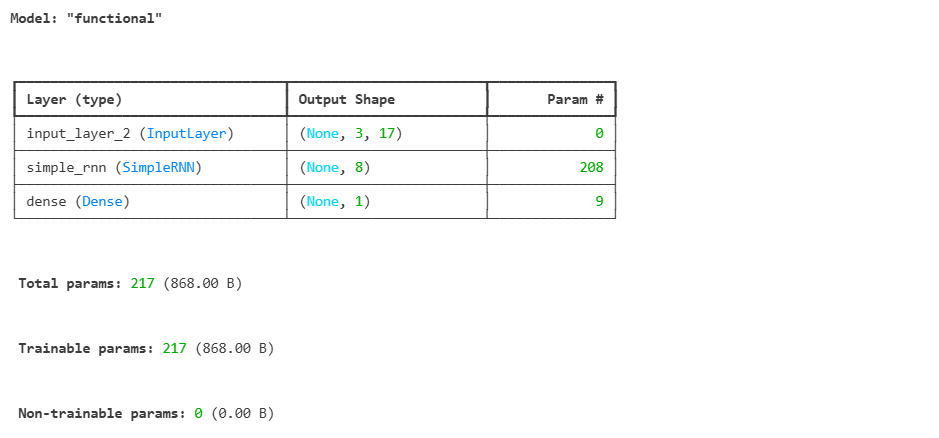
import numpy as np

model.compile(loss="binary_crossentropy", optimizer="adam", metrics=['accuracy'])
labels = np.array([1, 0, 1])

model.fit(one_hot_encoded, labels, epochs=3)
실습 (워드 클라우드)
텍스트 데이터를 시각화하여 각 단어의 빈도(or 중요도)에 따라 단어의 크기를 다르게 표현하는 기법
1. 텍스트 전처리
2. 단어 빈도 계산
3. 단어 크기 결정
4. 단어 배치
5. 시각화
!pip install wordcloud
!conda install fonts-nanum
!pip install gdown
- 데이터 준비
import gdown

url = 'https://drive.google.com/uc?id=13Rs5KQiFFIM047i0qLS86_GZvoVnmrRk'
output = 'sns_spam.csv'

gdown.download(url, output)
- 텍스트 전처리
import numpy as np
import pandas as pd
from konlpy.tag import Okt
from collections import Counter
from wordcloud import WordCloud
import matplotlib.pyplot as plt

spam_df = pd.read_csv('./sns_spam.csv')
# spam_df.head()

corpus = spam_df['CN'][0]
# corpus

okt = Okt()
nouns = okt.nouns(corpus)
# nouns

# 빈도수 계산
word_count = Counter(nouns)
# word_count

# 불용어 처리
ko_stopwords = ["및", "더", "수"]
word_count = {word: count for word, count in word_count.items() if word not in ko_stopwords}
# word_count
- WordCloud 생성
wordcloud = WordCloud(
    width=800,
    height=800,
    background_color='white',
    font_path='C:\\Windows\\Fonts\\gulim.ttc'
).generate_from_frequencies(word_count)

# wordcloud

plt.figure(figsize=(10, 10))
plt.imshow(wordcloud)
plt.axis('off')
plt.show()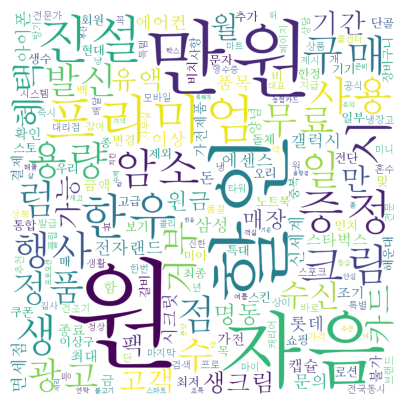
- 텍스트 전처리 없이 WordCloud 생성
text = spam_df['CN'][0]

word_count = Counter(text)

wordcloud = WordCloud(
    width=800,
    height=800,
    font_path='C:\\Windows\\Fonts\\batang.ttc'
).generate_from_frequencies(word_count)

plt.imshow(wordcloud)
plt.axis('off')
plt.show()
- 전체 데이터를 corpus로 WordCloud 그리기
corpus = spam_df['CN']

okt = Okt()
nouns = []

for corpus_temp in corpus:
    nouns.extend(okt.nouns(corpus_temp))

# nouns

word_count = Counter(nouns)

ko_stopwords = ['은', '는', '이', '가', '및', '더', '수']
word_count = {word: count for word, count in word_count.items() if word not in ko_stopwords}
from PIL import Image
wordcloud = WordCloud(
width=800,
height=800,
background_color='white',
font_path='C:/Windows/Fonts/gulim.ttc',
mask=np.array(Image.open('C:\\skn_17\\images.jpg'))
).generate_from_frequencies(word_count)
plt.imshow(wordcloud)
plt.axis('off')
plt.show()
실습 (Subword Tokenizer)
Subword Tokenization은 희귀 단어 문제를 해결하고 어휘 크기를 효율적으로 관리하기 위해 단어를 더 작은 단위(subword)로 분할하는 기법이다.
👉🏻 필요성
회귀 단어와 신조어 처리
어휘 사전 크기 축소로 메모리 효율성 향상
형태소 정보를 보존하여 언어 이해 능력 향상
멀티 언어 모델에서 통합된 토크나이저 사용 가능
1. WordPiece
자주 등장하는 문자 시퀀스를 병합하여 서브워드 사전을 구축한다.
BPE와 유사하지만, 확률 기반 접근을 사용한다.
2. BPE (Byte Pair Encoding)
가장 빈도가 높은 문자 쌍을 반복적으로 병합한다.
3. SentencePiece
단어 경계에 의존하지 않고, 문장 전체를 하나의 문자열로 취급한다.
▶ WordPiece와 BPE는 단어 경계를 고려하지만, SentencePiece는 고려하지 않는다.
- 네이버 영화리뷰 학습
# 네이버 영화 리뷰 데이터 로드
import urllib.request
import os

# 파일 다운로드 함수
def get_file(filename, origin):
    cache_dir = os.path.expanduser('~/.torch/datasets')
    os.makedirs(cache_dir, exist_ok=True)
    filepath = os.path.join(cache_dir, filename)

    if not os.path.exists(filepath):
        print(f"Download 진행 중 {origin}")
        urllib.request.urlretrieve(origin, filepath)

    return filepath
ratings_train_path = get_file("ratings_train.text", "https://raw.githubusercontent.com/e9t/nsmc/master/ratings_train.txt")
ratings_test_path = get_file("ratings_test.text", "https://raw.githubusercontent.com/e9t/nsmc/master/ratings_test.txt")
ratings_train_path, ratings_test_pathimport pandas as pd
ratings_train_df = pd.read_csv(ratings_train_path, sep="\t")
ratings_test_df = pd.read_csv(ratings_test_path, sep="\t")
display(ratings_train_df)
display(ratings_test_df)ratings_test_df.isna().sum() # train, test df 모두 document에 결측치 있음
ratings_train_df = ratings_train_df.dropna(how='any')
ratings_test_df = ratings_test_df.dropna(how='any')
ratings_train_df.shape, ratings_test_df.shape # ((149995, 3), (49997, 3))
# 텍스트 데이터만 따오기
with open('naver_review.txt', 'w', encoding='utf-8') as f:
for doc in ratings_train_df['document'].values:
f.write(doc + '\n')
👉🏻 SentencePieceTokenizer
!pip install sentencepieceimport sentencepiece as spt
input = 'naver_review.txt'
vocab_size = 10000
model_prefix = 'naver_review'
cmd = f'--input={input} --model_prefix={model_prefix} --vocab_size={vocab_size}'
spt.SentencePieceTrainer.Train(cmd) # 모델 학습 및 저장sp = spt.SentencePieceProcessor()
sp.load(f'{model_prefix}.model') # 토커나이저 모델 로드
for doc in ratings_train_df['document'].values[:3]:
print(doc)
print(sp.encode_as_pieces(doc)) # 토큰화
print(sp.encode_as_ids(doc)) # 시퀀싱
print()
"""
아 더빙.. 진짜 짜증나네요 목소리
['▁아', '▁더빙', '..', '▁진짜', '▁짜증나', '네요', '▁목소리']
[62, 877, 5, 31, 2019, 68, 1710]
흠...포스터보고 초딩영화줄....오버연기조차 가볍지 않구나
['▁흠', '...', '포스터', '보고', '▁초딩', '영화', '줄', '....', '오', '버', '연기', '조차', '▁가볍지', '▁않', '구나']
[1634, 8, 4908, 159, 1460, 33, 264, 60, 173, 548, 410, 1224, 7396, 754, 440]
너무재밓었다그래서보는것을추천한다
['▁너무', '재', '밓', '었다', '그래서', '보', '는것을', '추천', '한다']
[23, 369, 9781, 429, 3780, 143, 6266, 1945, 314]
"""# 단어사전 / 모델의 어휘 크기(vocabulary size) 출력
sp.get_piece_size()
sp.GetPieceSize() # 10000
# 인코딩
text = ratings_test_df['document'][500]
tokens = sp.encode_as_pieces(text) # 텍스트 -> subword 단위 분할
id_tokens = sp.encode_as_ids(text) # 텍스트 -> subword 단위 분할 -> 고유 ID로 변환
print(text)
print(tokens)
print(id_tokens)
print("".join(tokens).replace("▁", " ").strip())
# 디코딩
print(sp.decode_pieces(tokens))
print(sp.decode_ids(id_tokens))
"""
아재미때까리진짜없네
['▁아', '재미', '때', '까', '리', '진짜', '없네']
[62, 908, 214, 480, 43, 204, 2657]
아재미때까리진짜없네
아재미때까리진짜없네
아재미때까리진짜없네
"""
- BertWordPieceTokenizer
!pip install tokenizersfrom tokenizers import BertWordPieceTokenizer
# lowercase=False (소문자로 토큰관리 X / 한국어는 대소문자가 없음)
# strip_accents=False (발음 강세문자 기호 제거 X / 한국어에서는 지모 분리 가능성)
tokenizer = BertWordPieceTokenizer(lowercase=False, strip_accents=False)
vocab_size = 10000
tokenizer.train(
files = ['naver_review.txt'],
vocab_size = vocab_size,
min_frequency = 5,
show_progress = True
)
tokenizer.save_model('./', 'bert_word_piece_from_naver_review')
text = ratings_test_df['document'][500]
encoded = tokenizer.encode(text)
print(encoded.tokens) # ['아', '##재미', '##때', '##까', '##리지', '##ᆫ', '##짜', '##없네']
print(encoded.ids) # [830, 1198, 987, 878, 2774, 563, 923, 3217]
print(tokenizer.decode(encoded.ids)) # 아재미때까리진짜없네
'LLM' 카테고리의 다른 글
| 3.3.6 [NLP] 자연어 딥러닝(언어 모델링) (0) | 2025.08.22 |
|---|---|
| 3.3.5 [NLP] 자연어 딥러닝(텍스트 분류) (0) | 2025.08.22 |
| 3.3.4 [NLP] 자연어 딥러닝(시퀀스 모델링) (1) | 2025.08.21 |
| 3.3.3 [NLP] 자연어 데이터 준비(자연어 임베딩) (0) | 2025.08.21 |
| 3.3.1 [NLP] 자연어 데이터 준비(개요 및 기초) (8) | 2025.08.18 |
